Release notes and support

What’s new in Flyntlok, and how to use it.

Every Flyntlok release note since 2020, plus 147 step-by-step support articles for your team. Search them all in one place.

Popular:

Latest release

Flyntlok is going mobile (app).

Flyntlok Mobile enters closed beta, starting with Sales and CRM. Plus Inbox conversation assignment, clearer rental availability, warranty Labor Types that fill in on their own, a new Payment Types editor and 17 fixes.

Opens with a note from

Jenny Moebius

,

Chief Marketing Officer
October 29, 2026 Release Notes
19
17
october-29-2026-release-notes

Customer success

More dealer office hours: shape what comes next

Due to continued interest and great feedback from y'all, we're hosting more office hours dedicated to specific areas of Flyntlok, giving you direct access to our product team to share feedback, ask questions, and help shape what we build next.

  • Service: Scheduling, work orders, and shop floor tools. Thursday, 11/5, 3 p.m. ET. Register
  • CRM: Leads, customer records, and sales workflows. Wednesday, 11/11, 4 p.m. ET. Register
  • Mobile: On-the-go access and mobile workflows. Thursday, 11/12, 3 p.m. ET. Register
  • Parts & Purchasing: Inventory, ordering, and vendor management. Friday, 11/13, 3 p.m. ET. Register
  • Accounting & Finance: Billing, reporting, and financial workflows. Wednesday, 12/2, 3 p.m. ET. Register
  • Rentals: Rental agreements, tracking, and fleet management. Tuesday, 12/8, 2 p.m. ET. Register

As always, THANK YOU for sharing your experiences with us… we love driving that feedback directly back into the product.

The industry’s fastest customer support

In case you missed it: see our built-in, rapid customer support in action with Flyntlok Support Consultant JP Raiger, and learn about the people, process and high standards behind the industry’s fastest response times. Listen to Flyntlok Unlocked Ep. 4.

Mobile

New mobile app: now accepting beta testers [Closed beta]

By Christian E. · For Sales and CRM teams

What's new

We're excited to announce a closed beta of Flyntlok's new native Mobile app. We're opening it to a small, exclusive group of five users: three on iPhone and two on Android.

This first release focuses on CRM. We'll be extending the app to other workflows, including Service, in the coming weeks. For now, we're looking for beta users whose teams work mainly in Sales and CRM.

If your dealership would like to be considered, please submit a support ticket letting us know you're interested and whether your team uses iPhone or Android. We'll follow up with next steps and instructions for downloading the beta app. Spots are limited, so we encourage interested dealers to reach out soon. We can't wait to hear what you think!

Why it matters

The Flyntlok Mobile app is being built for how you work away from your desk. The user experience is more optimized for the phone, so you can get things done on the shop floor, in the yard, or out with a customer. Easier login gets you in quickly, and notifications keep you on top of what needs your attention without having to go looking for it. As a beta participant, your feedback will directly shape what we build next, so please tell us what's working and what isn't.

How to join the beta

  1. Open a support ticket from the ? icon in Flyntlok.
  2. Say you’re interested, and whether your team uses iPhone or Android.
  3. We’ll follow up with next steps and the beta download.

5 spots: 3 iPhone, 2 Android

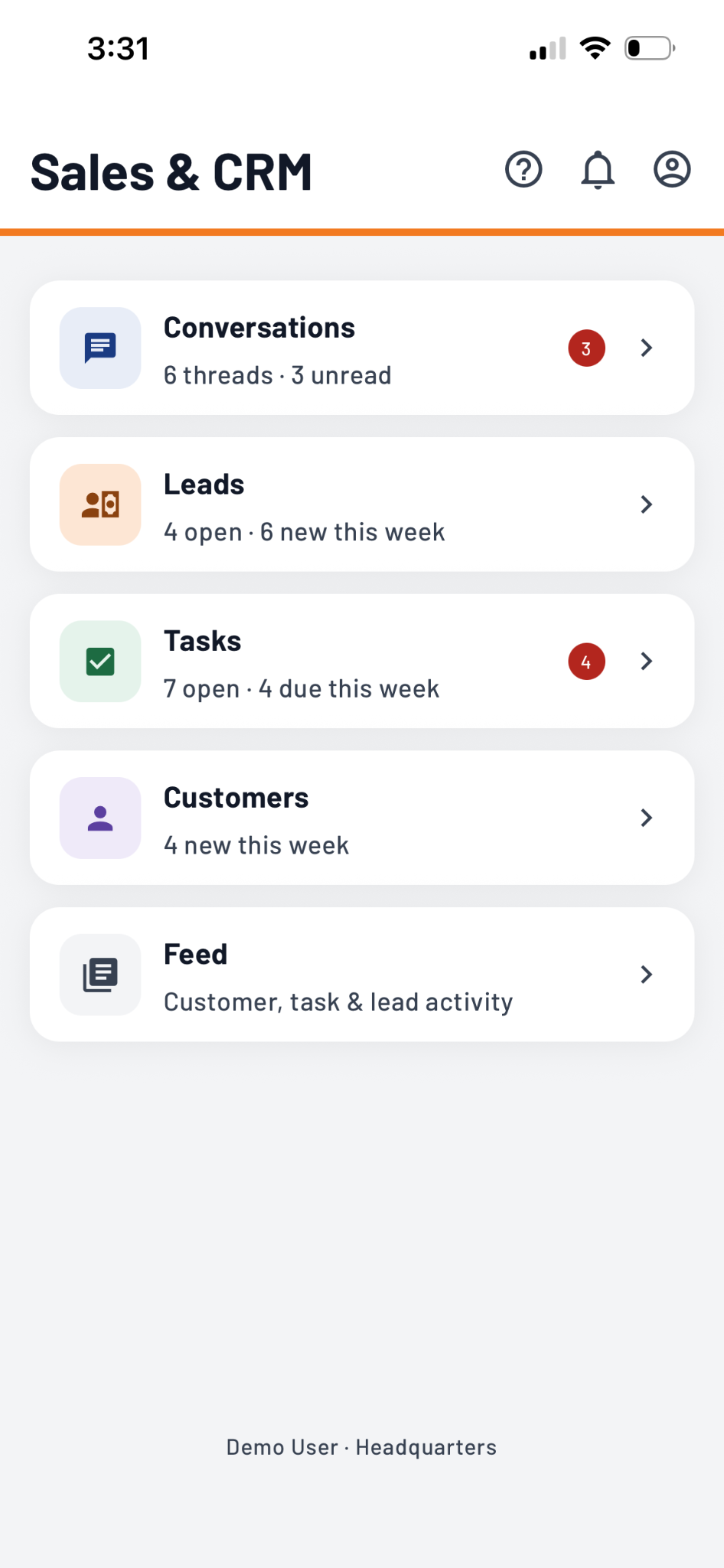
Flyntlok Mobile Sales & CRM home screen with Conversations, Leads, Tasks, Customers and Feed
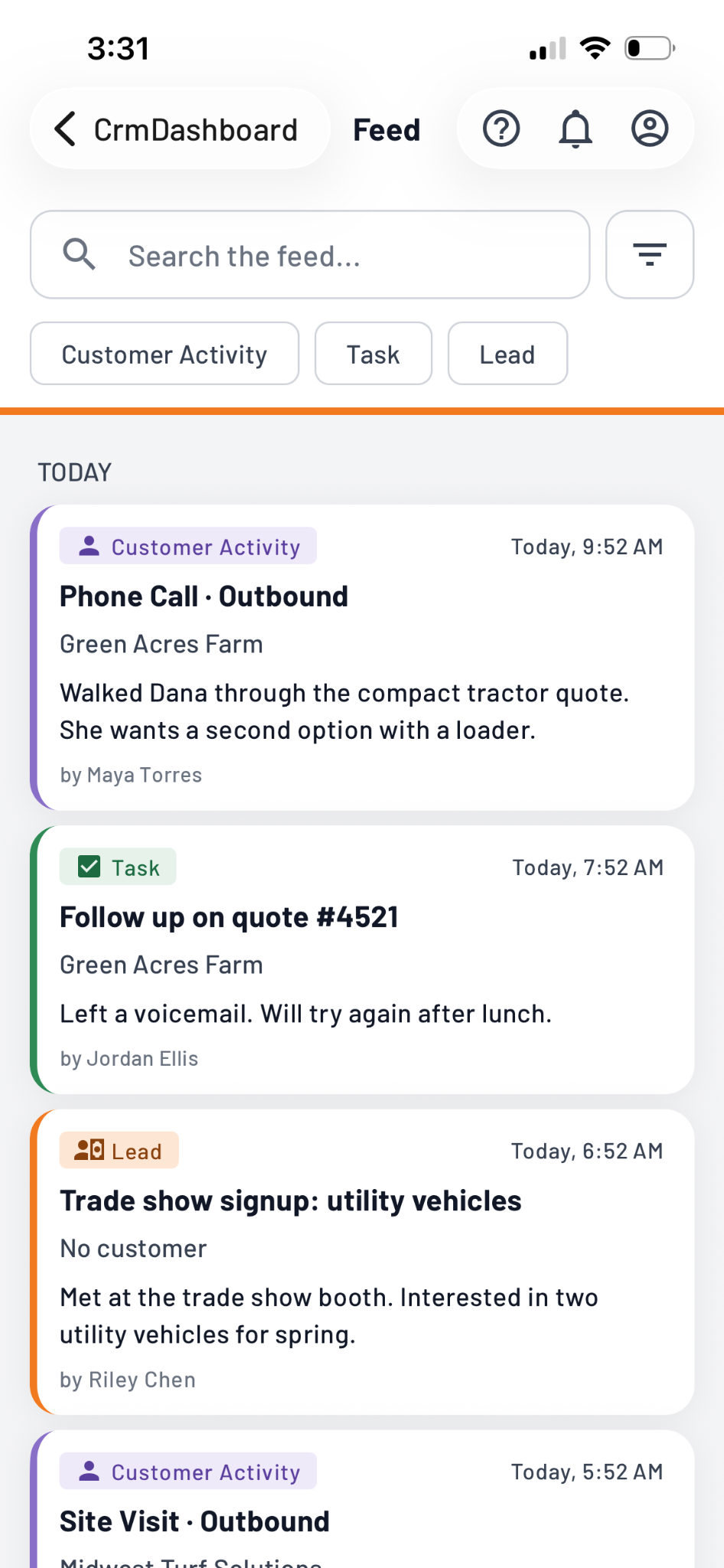
Flyntlok Mobile Feed showing the day's customer activity, tasks and leads
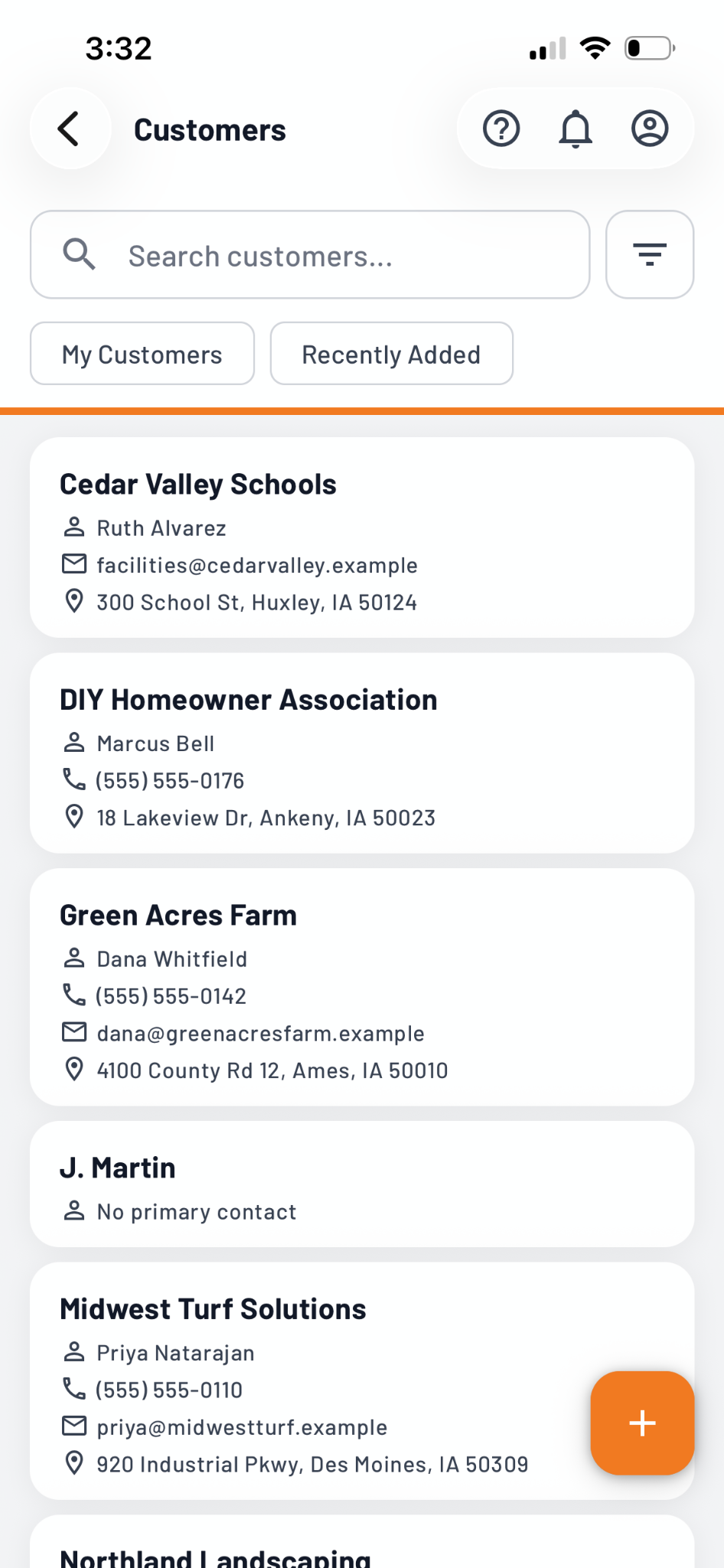
Flyntlok Mobile Customers list with contacts, phone numbers and addresses
Sales & CRM home, Feed and Customers in the beta app

Request machine service right from your phone while in the field

By Christian E. · For Sales teams

What's new

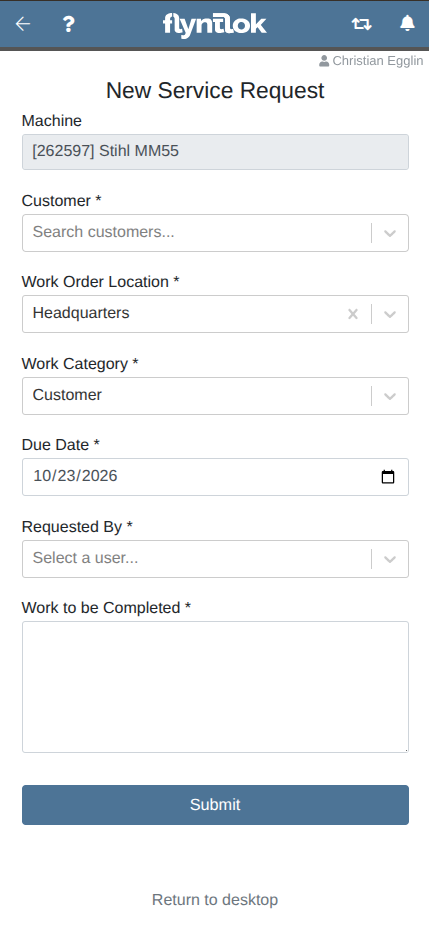
On the Mobile Machine Dashboard, there is now an action to quickly create a Service request for that machine.

Why it matters

Sales teams are now able to put in a request with the service department while in the field with a customer.
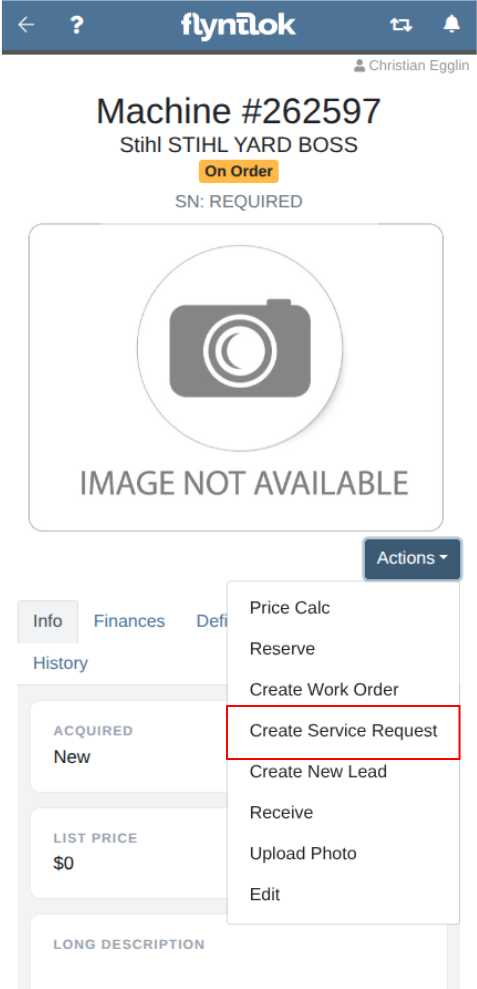
Mobile Machine Dashboard Actions menu with Create Service Request highlighted
New Service Request form on mobile with Machine, Customer, location, category, due date and work to be completed

Keep customer contact information current wherever you work

By Christian E. · For Sales teams

What's new

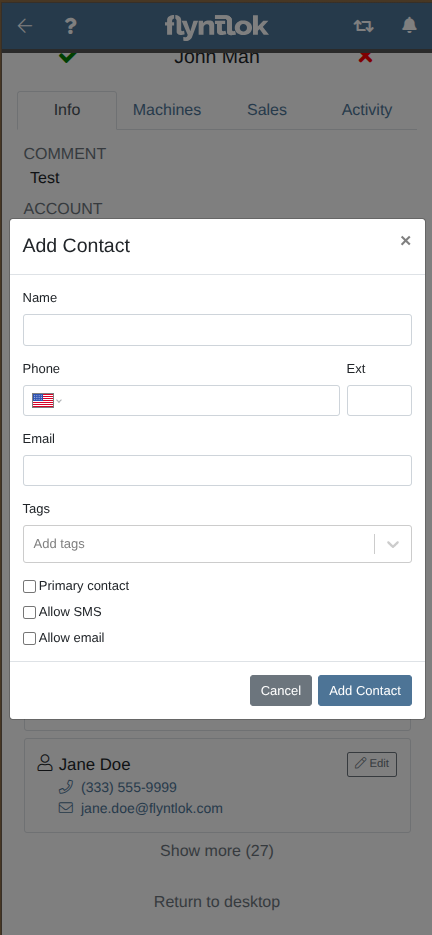
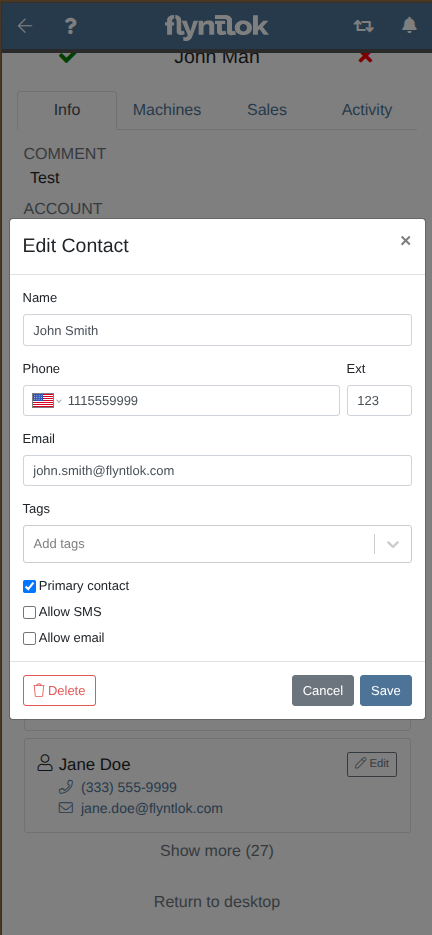
In the customer contact list on the mobile customer dashboard, individual contacts can be updated or deleted or new contacts added.

Why it matters

Sales teams can manage and keep up to date customer contacts on the go.
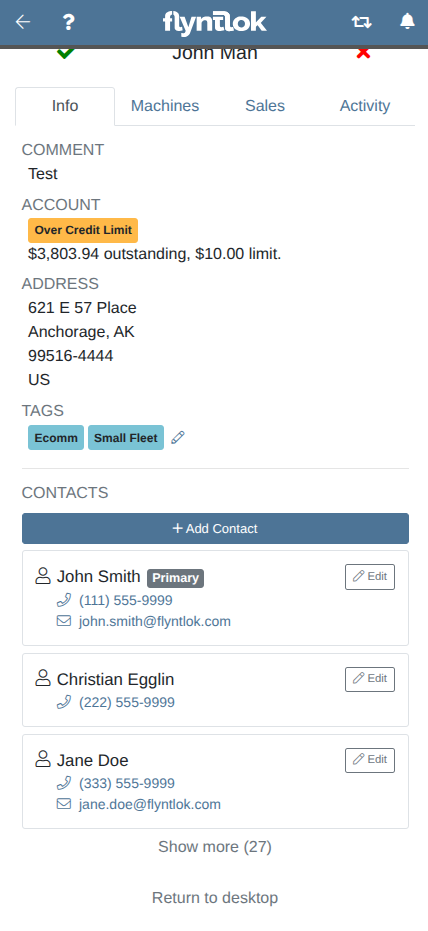
Contact list on the mobile customer dashboard with Add Contact and Edit buttons
Add Contact form on mobile with name, phone, email, tags and opt-in checkboxes
Edit Contact form on mobile with a Delete button

Update customer tags on the spot, no trip back to your desk

By Yasmine C. · For Salespeople

What's new

Customer tags are now displayed on the Mobile customer dashboard and can be edited directly.

Why it matters

Salespeople can now tag a customer from their phone right after a visit or call, instead of trying to remember it when they get back to their computer.
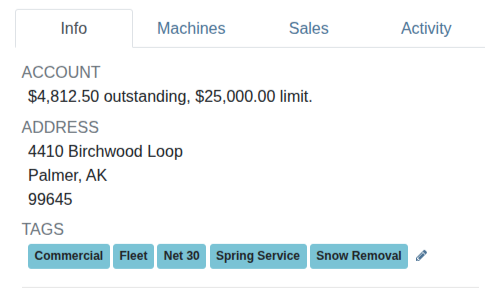
Customer tags on the mobile customer dashboard with an edit pencil

See all user-created tags in the customer dashboard on mobile

By Yasmine C.

What's new

Previously only standard Flyntlok-defined tags like 'primary' or 'accounting contact' were displayed in the mobile customer dashboard, now all tags are displayed.

Why it matters

This allows users to access additional information about a customer at a glance, on the mobile view.
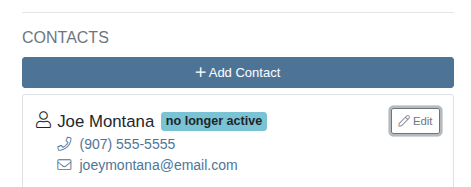
A user-created no longer active tag shown on a contact in the mobile customer dashboard

Talk to the product team

Upcoming office hours with the Flyntlok product team. Sessions drop off this list once they happen.

What each session covers

2026

October 29, 2026 Release Notes

Flyntlok is going mobile (app).

Flyntlok Mobile enters closed beta, starting with Sales and CRM. Plus Inbox conversation assignment, clearer rental availability, warranty Labor Types that fill in on their own, a new Payment Types editor and 17 fixes.

Includes:

New Mobile App: Now Accepting Beta Testers · Request Machine Service Right from Your Phone While in the Field · Keep Customer Contact Information Current Wherever You Work · Update Customer Tags on the Spot, No Trip Back to Your Desk · See All User-Created Tags in Customer Dashboard on Mobile · Keep Customer Conversations Moving with Clear Ownership: Assign an Inbox Conversation to a Salesperson · Turn Inbox Inquiries into Customer Records Without Leaving the Conversation · See What a Customer Last Purchased Without Leaving the Conversation · Know What's Available to Rent Before Making a Customer Commitment with Clearer Machine Availability · Plan Rental Deliveries and Pickups Faster with a More Informative Timeline · Speed Up Rental Customer Setup by Capturing Driver's License Details in One Step · Get Warranty Labor Rates Right from the Start · Keep Every Work Order Accounted for with Required Departments · Save Time Filing Warranty Claims By Copying Complaint, Cause, and Correction With One Click · New Payment Types Editor: Catch Payment Configuration Problems Before They Disrupt Your Business · Track Invoiced Parts Before They Arrive, Right from the Purchase Order · Keep STIHL Warranty Registrations Moving Without Outdated Fields Like Rewards Salesperson · Discount by Dollar Amount on Sales Order Lines · STIHL Registered Machines Showing as Eligible · Department and Division Missing from Create New Purchase Order · Special Order Substitutions No Longer Change the Customer’s Price · Rental Item Minimum Cost Not Multiplied by Quantity · Customer Signature Time Shown in the Wrong Time Zone on Rental Contracts · Machine Costs Now Use the Exchange Rate for the Vendor Invoice Date · $0 Sales Orders Not Posting to QuickBooks Online · Cancelled Reversals Re-Posting Receiving Vouchers to QuickBooks Online · Incorrect Mod Pricing on Sales Orders · Customer Edit Page Crashed When a Date Was Typed Without Slashes · Estimate Jobs Listed in a Consistent Order After a Job Transfer · Job Notes Box Takes Up Less Space · Emailed Estimates Missing From the Work Order Dashboard Emails Section · TC-721A Form Missing the Trailer Year · Machine Status Not Updated When a Truckload Move Completes · Clearer Message When Improve With AI Finds No Work Details · IBS Approval Requests Now Include Contact Name and Email
Mobile, Sales & CRM, Rentals, Service, Accounting & Finance, Parts & Purchasing, Integrations, Point of Sale
19
17

October 15, 2026 Release Notes

Your job notes may be telling you where revenue is slipping away.

AI Review helps catch parts and supplies mentioned in job notes but missing from the parts list. Plus the new QuickBooks Online Manager, customer texts into leads, and Work Order layouts you can make your own.

Includes:

AI Review Checks Job Notes Against the Parts List: Catches Unbilled Parts and Supplies Before Invoicing · Match Warranty Credits to Repairs with Claim Numbers on Jobs · Send Technicians to the Right Site with Names in the Address Picker · Find What You Need Faster with a Custom Work Order Info Tab · Introducing the QuickBooks Online Manager: Simplify Posting and Track Results · Revisit Sage Posting Results to Resolve Issues and Confirm Success with Sage Controls Posting History · Turn Customer Texts into Leads Without Retyping the Details · Update Contact Details Once and Keep Tasks and Customers in Sync · Catch Duplicate Contacts Before They Split Your Customer History with Duplicate Contact Warnings · Set Rental Contract Times Faster with Fewer Clicks with Simpler Time Selection on Hourly Rental Contracts · Keep Rental Dates and Billing in Sync with One Bulk Check In / Check Out Update · Keep Your Inventory Visible on the Bobcat Parts Trading Network with Custom Email Subject Lines · Find Parts Faster with Bin Locations in Every Item Search · See Which Attachments Have Arrived Before the Parent Machine with OnHold Status · Browse Items and Machines Without Repeating Your Mobile Search · Update Inventory Counts Right from the Mobile Item Dashboard · Scan Item Details More Easily with a Cleaner Mobile Dashboard · Narrow Your Mobile Lead Search with Multiple Filter Selections · Discount Note Shows Wrong Currency · Inactive Machine Deficiencies Still Showing on Mobile · Mobile User Permissions Differing from Desktop Permissions · Reserved Machines Showing as Available on New Rental · Machine Dashboard Work Totals Mismatch · Bobcat Parts Catalog Showing Wrong Stock for Some Part Numbers · New User Time Zone Location Default · Work Order Status Automation Ignores Rejected Jobs · Work Orders Not Opening From the Service Scheduler "+more" List · Long Loading time for ERP Work Orders When Linking Work Orders for Traceability · Restock Truck Now Includes Parts From Every Page
Service, Accounting & Finance, Sales & CRM, Rentals, Parts & Purchasing, Mobile
18
11

October 1, 2026 Release Notes

Small frustrations have a way of adding up.

Faster receiving, easier access to service files, cleaner CRM records, and fewer manual steps across the dealership.

Includes:

Smart Receive Packing Slips to Stock Parts Before Invoices Arrive · Put Parts Away Faster with Bin Locations on Receiving Voucher · Print Pick Lists for Parts Transfers to Service Trucks on Inventory Dashboard · See Purchase Order Weight as You Build It · Coming This Week! Find and Download the Right Work Order Files Faster · Find Bin Location and Check List Prices Without Leaving the Work Order Parts Widget · Correct Labor Lines Without Leaving the Job · Capture Engine Details as You Create a New Work Order · Keep Safety and Machine Deficiencies Visible and Customers Informed · Open Machine Details and Reference Links Without Leaving Work Order · See Customer Billing Addresses Right on the Work Order · Record Each Machine’s Meter Reading from Its Job on Multi-Machine Work Orders · Keep Job Follow-Ups in View with Linked Tasks on the Work Order · Motive Telematics Integration: Plan Service with Nightly Meter Updates · Reprioritize Tasks and Leads in One Save with Bulk Edit · Keep Customer Contacts Accurate with Duplicate Detection · Call Customers Straight from the CRM Reviews Page · Find Part Purchase Orders on Tasks with Just a Few Digits · Text Rental Contracts for Faster, Paperless Signatures · See What’s Left to Bill After Rental Deposits and Invoices · Import Journal Entry Spreadsheets Faster with a Ready-Made Template · Trace Item History Even After a Location Closes in Review Transactions · Save Your Service Request View and Focus on Your Location · Log New Customer Activity from the Customer’s Dashboard · Mark Tasks Done in One Tap · Open External Machine Manuals and Reference Links in the Mobile Machine Dashboard · See Your Full Job Note as You Type: Input Expands to Fit Longer Notes · Non-Sellable Parts Appearing in the Invoice Parts Searcher · Zero Amount Tax Line Blocking Payment on Account · Broken Work Order Link On Associated Forms in Mobile View · Case-Sensitive Tag Search on Mobile Work Order Filters · All Items Report No Longer Shows Closed Locations · Pre-Approved Amount Warning Now Matches the Work Order Price · Invoices Not Syncing Tax to QuickBooks Online · Suggested Options Not Appearing From Timeline Views · Task Due Date Calendar Jumped a Month Instead of Opening the Next Month
Parts & Purchasing, Service, Integrations, Sales & CRM, Rentals, Accounting & Finance, Reporting, Mobile
27
9

September 17, 2026 Release Notes

This week's Flyntlok lineup is set.

AI-powered Spanish-to-English Tech Notes, smarter SMS tools for sales, new accounting controls, better rental estimates, and plenty of workflow improvements across the dealership.

Includes:

Document Repairs in Spanish. Let AI Handle the Translation to English. · Choose the Machine Metrics that Matter with a Fully Customizable Stats Header · Scan a Work Order Barcode and Jump Straight to the Right Record · Let Technicians Own Their Time, Without Risking Everyone Else’s · Request Parts Faster from Work Orders, Without Leaving the Keyboard · See the Current Sale Price at a Glance, Now Displayed on the Machine Dashboard · A Smarter SMS Inbox for Sales Teams: Never Miss a Customer Text Again · Keep Every Follow-Up Connected with Linked Sales Orders, Work Orders, and Purchase Orders on CRM Tasks · Log Every Sales Call Without Breaking Your Workflow: “Log Activity Dialog” Opens Automatically on Click-to-Call from the Leads Pages · Update Contact Names in Two Clicks, Without Retyping · Control Credit Risk with Account Holds that Block Charge-to-Account Payments · Import Journal Entry Lines from a Spreadsheet Instead of Keying Them Line by Line · Create Interim Rental Invoices Faster on One Screen · Quote More Accurate Out-the-Door Estimates on Rental Contracts · Prevent Rejected Bobcat Parts Trading Network Uploads · Apply Invoice Dates Across Every Machine in One Click · Catch Missing Vendors Before They Create Payables Problems · See Exactly When Every Lead Activity Happened on Mobile: Add the Date and Time of Events to the Lead’s History Tab · Find and Reassign Tasks Left to Inactive Users on Mobile · Capture the Make and Model Details on a Lead Without Leaving Mobile · Keep Teammates in the Loop While Logging Customer Activity: ‘Notify User’ now available on Mobile · Capture and Attach Photos to Leads on the Spot from Mobile · Find the Machine Info You Need Faster with Improved Mobile Machine Dashboard Layout · Receiving Voucher Shows the Date a Part Was Actually Received · Manufacturer Number Setting Not Applying on Purchase Order PDFs · Customer Balance Now Updates After a Payment On Account · Customer Balances Update More Reliably from Sage Intacct · Permissions for Machine Purchase Orders and Receiving Vouchers · Job Upsell on Mobile Work Order · Machine Cost Data Visible Without Permission · Service Request Submission Failures · Model Discount Now Applied to Invoices Created from a Lead · Machine List Price on Invoices Created from a Lead Left Out Attachments · Date Picker Stayed Open in Safari After a Task Due Date Selection · Assignee Picker Empty When Creating a Task from a Lead · Customer Search Returned No Results When Linking a Customer to a Lead · Duplicate Contact Created by a New Customer Activity
Service, Sales & CRM, Accounting & Finance, Rentals, Parts & Purchasing, Mobile
23
15

September 3, 2026 Release Notes

What can we make better in two weeks? Turns out, quite a bit.

Updates that make rental, receiving, service, and CRM workflows faster and easier.

Includes:

Keep Sales Orders open and ready to send after processing a Rental · Invoice Rental Contracts faster with one-click access · See a Rental Machine’s physical location without leaving the Contract · Process paid Sales Orders in one step, and reduce Drafts left behind · Find the right shipping address faster on any Invoice · Smart Receive fills customer commitments first when PO quantities are split · Smart Receive gets more accurate for Atlas Copco and STIHL invoices · Vendor terms keep Voucher due dates accurate automatically · AI Tech Notes capture richer, cleaner job notes right at clock-out · Protect Work Order deposits from being spent on the wrong sale · Email a Machine Move in one click directly from the Move Page · Machine Work Forms are easier to find, manage, and clean up · CRM Tasks keep every customer follow-up in one organized view · New CRM features surface where your sales team already works (left nav) · Guided CRM walkthroughs in CRM Tasks get Sales teams productive faster · Make/Model context helps sales connect the right equipment to every Lead · Exact Machine ID search gets salespeople to the right unit faster · Create CRM Tasks from Customer and Machine dashboards without the extra scrolling · Edit Job Service Notes on mobile without deleting and starting over · Keep your CRM Task workflow consistent from desktop to mobile · Capture Make/Model demand from CRM Tasks on mobile · Move between mobile and desktop without losing your place · Click-to-Call logs customer activity in one tap on mobile · Spot Problem Customers directly from the Sold Machines report · Machine Dashboard Showed "Checked In" After a Rental Rate Change · STIHL Registration Details Display Correctly on Machines · Slow Loading When Adding Parts to a Sale · Bin Location Missing on Service Truck Sales Orders · Rental Quote Email and Text Wording · Missing Quantity On Hand Badge When Quoting a Model · Custom FX Rate Not Accepting Certain Values · Rental Rates Not Updating When the Contract Location Changes · Error When Dragging Attachments Onto a Sales Order · Bobcat Parts Trading Network Export Sending Truck Inventory · Machine Cost Inflated by Fee-Only Vouchers on Purchase Orders · Phone Number Lands in the Right Field When Adding a Customer From a Work Order · Slow Loading When Searching Models to Sell · Pre-Approval Banner Stays Visible on Work Orders · Estimated Price Updates Immediately After Editing a Job
Rentals, Point of Sale, Parts & Purchasing, Service, Sales & CRM, Mobile, Reporting
24
15

August 20, 2026 Release Notes

This release gives AI a bigger job, and your people the final say.

AI-powered Tech Notes is now available to every technician, and new permissions and review tools keep your team in control of what gets edited, applied, and shared.

Includes:

AI Tech Notes moves to open beta! Now open to everyone · Turn existing technician notes into customer-ready write-ups with AI · Standardize Complaint, Cause, and Correction formatting in one click · Preview, personalize, and manage every SMS service reminder · Follow up faster from every SMS service reminder with link to text conversation · Confirm machine payoffs and rebates without leaving the Commission Report · Give customers cleaner Work Order PDFs without exposing internal references · Catch missing Cause and Correction notes before invoicing · Save maintenance report views and reach customers faster · See exactly which job is blocking a Work Order from invoicing · Giving dealers direct control over their moves: Edit Machine Moves without deleting and starting over · Bulk update dates and rate schedules across an entire rental contract at once · Find rentable equipment faster with smarter search filters · Give customers a more accurate rental total with estimated taxes before invoicing · Update Work Order thermal ticket terms without a support request · Protect sales credit and commission ownership after a machine sale · Capture make and model details without leaving the lead · Clear inactive leads from your working list without losing their history · Bring archived leads back into view in one click · Find and reassign tasks owned by inactive employees · Trust task dates across every CRM grid · Keep customer names accurate across sales and service documents · Find the right tasks faster with working due-date filters · Capture customer unit numbers during receiving, not after · Print scannable stocking labels anytime from the Item Dashboard · Track every Toro and Exmark TTC registration from one report · Keep STIHL purchase orders moving by entering vendor item numbers directly · Keep STIHL registrations moving with simplified Primary Use options · Prioritize the right mobile tasks with customer and due-date filters · See machine list prices at a glance on mobile · Clear inactive leads from mobile without losing their history · Find the right mobile lead faster with smarter filters · Collapse long service notes for faster mobile navigation · Improve readability when editing service notes on mobile · See more leads and tasks at once on mobile with increased page size · Prevent duplicate Sage Intacct bills when receiving vouchers are deleted · Preserve department-level tracking on every Sage Intacct journal entry · Class Filter on the Journal Entry Page · Shopify Order Processing with Tax for Avalara · STIHL Registration Machine Selections No Longer Stay After Revisit · Smart Receive Captures Invoice Dates Correctly · Interim Invoice Billing Duration for Hourly Rentals · Parts Added to "Awaiting Start" Work Orders No Longer Land as a Quote · Error When Quoting a Machine With a Long Model Name · Permission-Locked Fields in AI Tech Notes Review
Service, Rentals, Point of Sale, Sales & CRM, Parts & Purchasing, Integrations, Mobile, Accounting & Finance
37
8

August 6, 2026 Release Notes

Less chasing. More getting things done.

Automated SMS service reminders, easier-to-review AI-powered Tech Notes, faster Toro registrations and expanded mobile CRM workflows.

Includes:

Reduce No-Shows with Automated SMS Reminders to the Service Scheduler · Customize SMS Service Reminders to Fit Your Workflows on the Settings Page · Keep SMS Service Reminders Accurate When Appointments Change · Make Technician Corrections Easier to Scan with Bulleted Tech Notes Beta · Confirm Toro & Exmark Registrations at a Glance on Machine Dashboard · Register Toro & Exmark Machines Faster with TTC Data Link Registration Form Auto-Fill · Review and Edit Long Model Options Faster with Expandable Description Box · Schedule Follow-Ups Faster with Auto-Fill on All Customer Contacts in Tasks · Tie Follow-Up CRM Tasks to the Exact Machine · Capture and Act On Make/Model Interest Earlier · Keep Active Task Lists Focused with Task Archiving · Keep Warm Outreach Connected to the Right Lead · Turn Warm Outreach into a Lead Without Retyping the Details · Find the Right CRM Tasks with Reliable Table Filters · Open Saved Task Views Without Errors · Create Tasks Without Errors or Duplicates from the Customer Dashboard · Create a Customer from Anywhere via the Mobile View · Create Customers Without Leaving Mobile Lead or CRM Activity Forms · Correct or Edit Customer Activity Details On Mobile · Call Customers Faster with One-Tap Click-to-Call For Contacts · View and Search CRM Tasks, including Task Details, On the Move · Capture Follow-Up Tasks the Moment They Arise via Mobile · Keep CRM Task Details Current from Anywhere via Mobile · Make Sage Intacct Posting Decisions Faster with Post Dates Now Shown in the Internal Invoices Dropdown on Sage Intacct Controls · See Quote Outcomes at a Glance with Quote Accepted and Rejected Labels · Protect Margins with Better Control Over Card-Fee Waiver Permission · Quote Parts with Confidence Using On-Order Quantities (Now Excludes Committed Parts) · Share Dealership Policies on Every Thermal Receipt with Add Your Own Footer · Compare Model Pricing and Inventory in One Report: Active Models Report Now Shows Units In Stock · Identify Jobs Tied to Down Machines Faster with New “Down” Column · Track Purchase Orders Using Both Item Numbers · Thermal Receipts Printing the Wrong Payment Time · Rental Work Orders Now Created in the Rental Contract’s Location · Duplicate Tax Rules Created on Double-Click in Tax Rule Editor · Rental Page Freezing During Multi-Day Duration Calculation · Purchase Orders Column on Company All Sales Orders Report · Duplicated Work Orders Inheriting Original Sales Project · Machine Valuation Report Understated Cost on Multi-Machine Work Orders · Duplicate Notifications for Work Order Parts Requests · Foreign Exchange Rate Not Being Applied To Some Multi-Currency Parts From Pricefiles · Using an Existing Deposit Toward a New Deposit No Longer Shorts the Balance · Model Quick-Create Now Records Vendor Cost in the Correct Currency · Journal Entries Posted as Bills to Sage Intacct No Longer Net to Zero · Multi-Currency Item Costs Not Updating Correctly on Receiving · Splitting Invoices w/ Interstate Billing Service (IBS) Payment
Service, Parts & Purchasing, Sales & CRM, Mobile, Accounting & Finance, Rentals, Point of Sale, Reporting
31
14

July 23, 2026 Release Notes

You asked. We got to work.

Our first round of Office Hours drew 142 signups across 63 unique users and 32 dealerships.

Includes:

Call Customers Faster, Directly from Leads and Tasks · Respect Customer Communications Preferences with Separate SMS & Email Opt-Ins · Find the Right Customer Contact Faster with Task Modal Autofill · Keep Customer Activity History Updated Automatically, Task Completion Now Creates New Activity · Log Activity Without Leaving the Task with Option to Add Activity from Task · Export More CRM Data Without the 100-Row LImit · Match SMS Conversations to the Right Contact Phone Number · Keep Multiple Contacts Connected to a Task · Keep Complete Customer Names Intact When Creating Tasks from Dashboards · Make Every CRM Task (including Unnamed) Easy to Identify and Open · Capture Cleaner Job Notes Faster with AI-Enhanced Voice-to-Text · Route and Organize Work Orders More Easily with Department Field Added to Work Order Worksheet · Make Work Order Priorities More Meaningful with Disabled Auto-Selected Priority Field · Smart Receive Gets Smarter: Matches More Parts, Even If Vendor Data is Messy · Find the Right Part Faster with Full Item Details in Parts Used/Reserved Search · Find the Right Machine Faster with Improved Mobile Filters for Machine Search · Update Machine List Price and Price Breakdown from Anywhere · Record Machine Deficiencies and Keep Deficiency Status Current Directly in Mobile View · Find the Exact Rental Machine Faster with New Rental Search by Serial Number · Give Rental Customers Clear Pickup and Return Times, Contract PDF Now Includes Times Out / In · Improve Sales Ownership and Commission Tracking with New Invoice PDF Including Salesperson Name · See Work Order Check-In Dates at a Glance with New Column: Check-In Date on WOs with SO Customer Report · Card Surcharge Included in Percentage Shipping Calculations · Machine Dashboard Showing Inactive Store Locations · Average Cost Updating When Disputing Quantity · Fix QuickBooks Online Bank Deposit Descriptions · Attachment Costs Double-Counted in Sales Project Down Cost and Invoices · Negative Total on Sage Machine Reconciliation Report · Receive All Workflows Not Showing Allocated Quantity · Machine Dashboard Minimum List Visibility · Hide Part Numbers on Thermal Receipt · Credit Card Fee Description with Gravity Card Fees
Sales & CRM, Service, Parts & Purchasing, Mobile, Rentals, Point of Sale, Reporting
22
10

July 9, 2026 Release Notes

More ways to shape Flyntlok.

New ways to share product feedback, smarter tech notes, stronger campaign tools, and better mobile workflows.

Includes:

AI-Powered Tech Notes (Smart Notes) Move to Open Beta · Updated Service Request Notifications · Smart Campaigns Now Generally Available to All Dealers · Schedule Smart Campaigns for Future Delivery · A Cleaner CRM Tasks View Defaults to Only Your Tasks · Protect Sensitive Machine Cost & Margin Data with Better Permissions · Clearer Visibility into SMS Messaging with Delivery Statuses · Fewer Clicks When Creating CRM Tasks · Faster Follow-Up with Primary Contact Now Visible on CRM Tasks Grid · Better Buying Committee Visibility with New Leads Assigned a Role · More Reliable John Deere Part Purchase Orders Through JDPoint · Stronger Control with New Permissions for IBS Customer Information · Call Customers Faster with Click-To-Call On Mobile Work Orders · Create a New Machine Faster for Multi-Machine Work Orders on Mobile · Customer Info Easier to Find with Mobile Customer Search & Dashboard · Less Rework When Mobile Photo Uploads Fail · Automatic Due Date for Cleaner Receiving and Accounting Handoffs · Easier Discount Visibility at Point of Sale · Improved report performance · Added Export to Upcoming Maintenance Page · All Parts On Order Add Order Type Column · Updated Utah Machine Transaction Disclosure Form TC-466 · Estimated Hours Column Incorrect on All Work Orders Report · Customer Panel Appearing Partially Collapsed on Sales Orders · Unable to Create Manufacturing Work Orders · TTC Data Link: Incorrectly Registering Trade-In Machines · CRM: Mobile Lead Status Updates Respect Configuration · Model Info Showing Wrong Sales Totals · Search Contacts on Work Orders · Multi-Payment Checks Double-Counted on Z Detail Report
Service, Sales & CRM, Integrations, Mobile, Parts & Purchasing, Accounting & Finance, Reporting
19
11

November 5th, 2025 Release Notes

Includes:

Quick Receive on Parts via Receiving Voucher · Bulk “Receive All” Action on Receiving Vouchers · Part Purchase Order Extract Line Item Visibility · Machine Telematics Improvements · Machine Move and Quick Transfer Improvements · Associate Google Reviews with Customers · Enhanced Visibility on Duplicate Open Customer Leads · Quote Model & Create Similar" on Point of Sale · Sales Order Cost Report · Associate Serialized Items on Invoices Without Fulfillment · My Work” Improvements on Mobile · Work Order Status on Machine Dashboard Banner · Rate Changes on Long-Term Rental Contracts · Item Number2” and “MFG Number” on Inventory Sprint Count · Submit Sage Intacct Journal Entries as Bills · Splits with Serialized Units · Serialized Item Returns · Serialized Parts Fulfillment · Sage GL Account Search on Vendor Edit Page · Overpayment Balance on Sales Order · Shopify Changes not Saving from Item Edit Page · List Price Reset on Vendor Save · Machines Created with Inactive Model · Items not Searchable When Configuring Kit · Error when Creating Item from Point of Sale · Sage Journal Entries Incorrectly Sending Class · Transferring Jobs to a New Work Order · Customer and Vendor Edit Logging · ECR Work Order Not Linking to Rental Contract · Batch Stihl Registration · Machine’s Responsible Location Update After Move · Service Scheduler Filters · Variance Report Item Display Issue · Inactive Customer Search · Sage Account Balance Display · Shrunken Text on Invoice PDF · Flyntlok Fantasy Football Update

September 3rd, 2025 Release Notes

Includes:

Adding Discount Tiers to New Customers on Invoice · Machine Warning Notes in Point of Sale · View Other Location Quantities in Magic Wand Search · Dollar Margin while Viewing Costs on Point of Sale · Improvements to Point of Sale Import Tool · Subtotal Breakdown on Work Order Estimates · Edit "Advertise" on Mobile Machine Dashboard · File Downloading Enhancements on Work Order Dashboard · New "Recovery" Goal on Service Dashboard · Estimated Total Billable on Rental Contract · Permission for Editing Accounting Fields on Customers · Sage Customer ID on Sales Order PDFs · Check out our Flyntlok YouTube channel for more highlights of the application! · Work Order Estimate Parts List Changing Order · Invoice Machine Make Filter on Survey Rules · Default Billing Style on Work Order Job Templates · Machine Dashboard Quick Transfer · Sales Order PDF Missing City/State/Zip · Actions Menu Cut Off on Smaller Screens · Totals Cut Off on Part Voucher PDF · Signature Warning Shown After Collecting Signature · Unable to Create Tags When Editing a Customer · Labor Type Override Replacing Job Template Defaults · True/False Filters Not Working on Item Types Editor · Error Switching from Inactive to Active Model on Machines · No Error Message When Invoicing Work Order · Inactive Model Not Indicated When Editing a Machine · Machine Creation with Inactive Models · Tax on Payment Lines in QuickBooks · Part Purchase Order Not Showing Part Details · Customer Balance Report Crash · Discount % with Custom Options on Machines · Flyntlok Fantasy Update · Learn More at Flyntlok Dealer Management System

Earlier releases

No release notes match. Try a feature name like Smart Receive or Payment Types, or switch to support articles.

New and updated

Fresh how-to guides

Browse by area

Every guide, sorted by where you work

147 articles across 10 areas

Area

No support articles match. Try a shorter word, or open a support ticket from the ? icon in Flyntlok.

Can’t find what you need?

Click the ? icon anywhere in Flyntlok to open a support ticket. A link to the page you’re on is attached for you, and you can expect a reply from Flyntlok’s help desk within minutes.

How to submit a ticket
Questions

What dealers ask

Quick answers about updates, help and feedback. Every answer comes from Flyntlok’s release notes and support articles.

How often does Flyntlok release updates?

About every two weeks. Each release note lists every update and fix by area.

What changed in the latest Flyntlok release?

October 29, 2026 Release Notes

:

Flyntlok Mobile enters closed beta, starting with Sales and CRM. Plus Inbox conversation assignment, clearer rental availability, warranty Labor Types that fill in on their own, a new Payment Types editor and 17 fixes.
Read the release

How do I get help with Flyntlok?

Click the ? icon anywhere in Flyntlok to open a support ticket. Add a title and a short description, and attach a file if it helps. A link to the page you’re on is attached automatically, and you can expect a reply from Flyntlok’s help desk within minutes. How to submit a ticket

Can I give feedback on what Flyntlok builds next?

Yes. Join an office hours session with the product team. Upcoming sessions are listed near the top of this page.