NEW:
Save Technician Time and Drive More Service Revenue with Voice-to-Text, AI-Powered Tech Notes
Check out the latest updates to the Flyntlok Equipment Dealer Management System
Flyntlok will be closed on Friday, April 2nd, in observance of Good Friday.

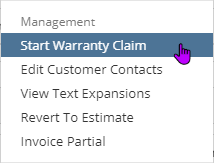
We have released a new feature that allows you to submit warranty claims from Flyntlok to the PACCAR eportal. From a Flyntlok work order, you will be able to open up a warranty claim that is prefilled with work order data!To get to the PACCAR form, your location will need to be configured by Flyntlok to allow PACCAR submissions. Then you will want to make sure that the work order is set to type Warranty. When those two conditions are met, you will see a Start Warranty Claim in the work order dashboard's actions drop-down.
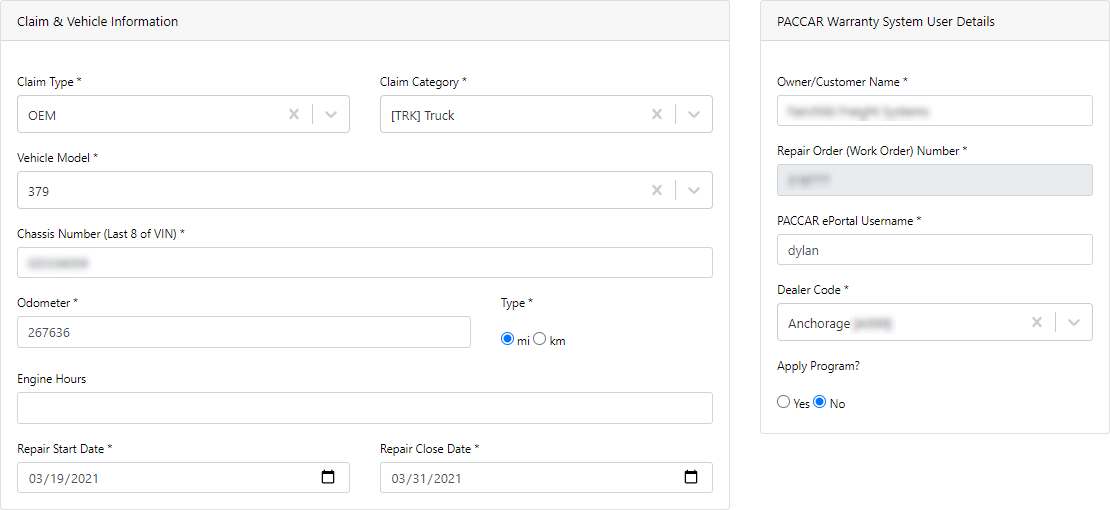
If it is the first submission from the work order, you will need to fill out the Claim & Vehicle Information section and then save the claim. This will generate the CF (Claim File) in the PACCAR eportal.
Once this is successfully saved, you will be able to select the jobs from the work order that you wish to submit a RO (Repair Order) for. This allows you to submit multiple jobs for one claim file or create multiple claim files from one work order.

When on a work order that you have already submitted a claim for, you will be able to go back to those previously submitted claims via the claim file selector or create a new claim.

If you have more questions, please reach out to Flyntlok. We will be able to provide a more in-depth Q/A about the warranty form and submission.
We have added more granular permissions around editing a machine. Below are the 7 new domains for machine permissions and the sections of a machine they control:
Flyntlok now supports the uploading of .EIF type files!
We enhanced the safety measures in place to prevent electronic POs from being submitted more than once.We also now don't submit the core item from a PO to Epiroc or PACCAR. The core item will remain on the Flyntlok PO to be received.
We apologize for the headaches in the past week that were caused by slow customer searching. We have made some changes to make customer search lightning fast!
We released this feature a few weeks ago and are pulling it back to reassess. We will have a better method for this in the future.
March 24th, 2021 Release Notes
Learn More at Flyntlok Dealer Management System
Check out our Flyntlok YouTube channel for more highlights of the application!






