NEW!
Meet Flyntlok at Equip Expo 2026:
Can we just say…Flyntlok dealers ROCK. Within literally 12 minutes of our last release notes, we had eight dealers reach out to kick the tires on Smart Campaign and double that number volunteer to take a look at Tech Notes with us. This is above and beyond all the ideas everyone sends in through support tickets, demos and training. Thank you for spending that time with us and contributing so directly to shaping everything we build at Flyntlok!

This release is proof that the best ideas come straight from you all: the people using Flyntlok every day. Cross-border dealers get multi-currency invoicing so Canadian-to-U.S. sales no longer require a calculator. Texas rental teams pick up TERP surcharge support and lat/long-based tax lookups for those job sites that don't have a proper address. Smart Receive keeps rolling — over 2,000 invoices processed in the past two weeks alone — and now handles environmental fees, processing fees, and other line items beyond freight and tax. And we're opening the doors on a brand-new Price File Upload Portal beta to replace the email back-and-forth once and for all. Let's dig in.
You may have noticed that we’ve shifted focus over the past few months to some meatier projects, many aiming to bring AI to our dealers without any of the friction from the headlines. A few updates on how these projects are going:
Opportunity
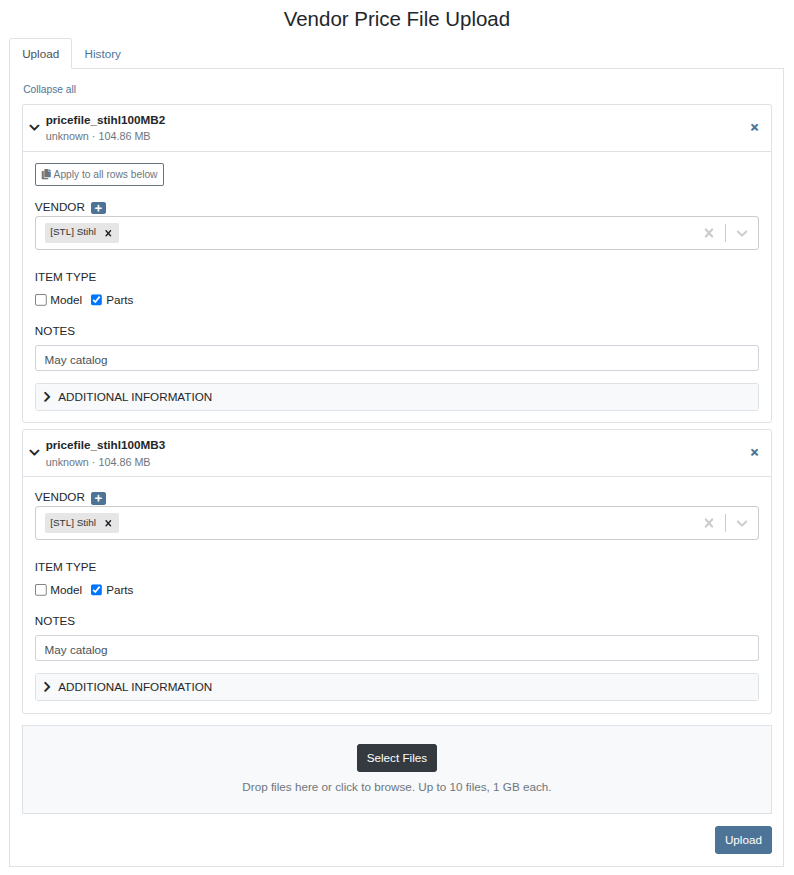
Today, submitting price files to Flyntlok is an email-driven process. Requests and responses are tied to individual inboxes, so when someone is out of office, context gets lost and turnaround slows down. There's no easy way to track whether a file has been picked up, is being processed, or hit an error — our dealers are left waiting and following up manually.
Solution
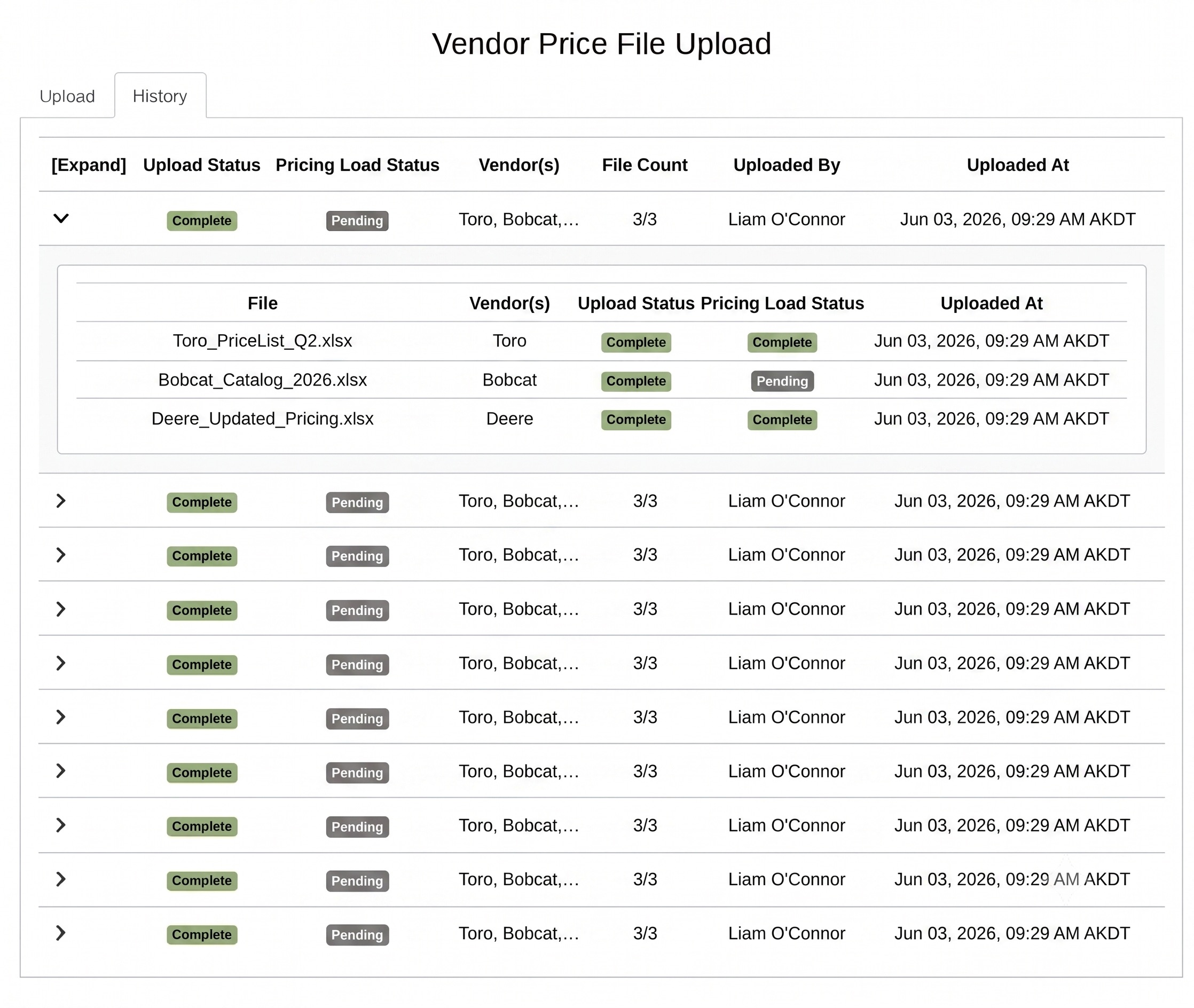
We have built a dedicated Price File Upload Portal inside Flyntlok that replaces the email workflow entirely. From a new page accessible under the wrench menu, you'll be able to upload your price files (Excel, CSV, XML, text, and more), provide details about the file like vendor and item type, and track status in real time — from upload through processing to completion. Please navigate to the wrench menu to access the new portal and reach via support ticket with any questions!
This is an admin-level feature that must be enabled on a per-user basis for the appropriate staff at each dealership. To request access, please submit a support ticket.
Opportunity
Dealers who operate across currency boundaries — such as a Canadian dealer selling equipment or parts to U.S. customers — previously had no way to present an invoice in the buyer's currency. This meant manual conversions and off-system workarounds to close cross-border sales.
Solution
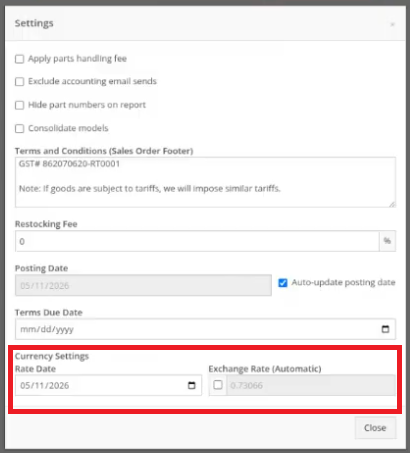
Flyntlok now supports invoice-level currency conversion. When creating an invoice, users can toggle a foreign currency, and the system will automatically convert list prices using a daily exchange rate. The conversion rate is editable and can be synced to the latest rate with one click, giving dealers full control — similar to the workflow in QuickBooks. This lets dealers generate professional invoices in their customer's currency.
.png)
Opportunity
Dealers renting off-road, heavy-duty diesel equipment in Texas are required to collect the TERP (Texas Emissions Reduction Plan) surcharge on qualifying rental transactions — on top of standard sales tax. Until now, Flyntlok's Avalara integration for rentals didn't account for this surcharge, forcing dealers to track and apply it manually. Additionally, some delivery locations — job sites, for example — don't have a clean street address, making it difficult for Avalara to resolve the correct tax jurisdiction.
Solution
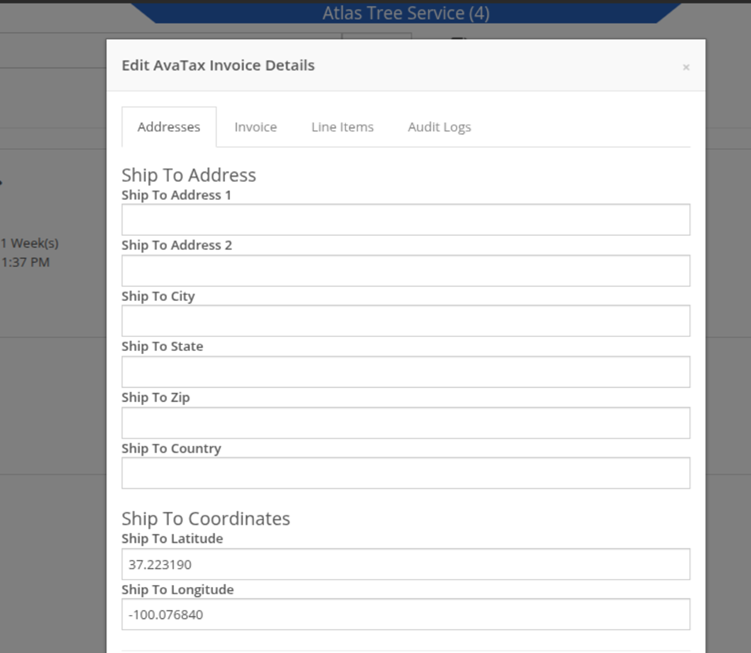
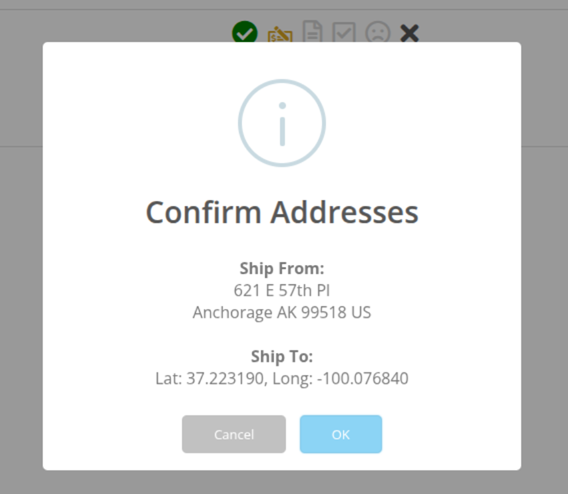
We've expanded Flyntlok's Avalara integration for rentals in two ways. First, TERP surcharge support has been added to rental contracts for Texas dealers. When a rental involves qualifying heavy-duty diesel equipment, check the TERP box on the contract and the surcharge will be calculated and applied automatically — no more manual line-item math. Second, Avalara tax lookups now support latitude/longitude coordinates in addition to street addresses. When a delivery is headed to a job site or other location without a standard address, entering lat/long ensures the correct tax jurisdictions are applied.
Opportunity
Default freight and tax fees for Smart Receive can be configured via Flyntlok Settings, so Smart Receive can automatically apply those fees if they’re read off an invoice and set up properly. However, receivers requested further support for other fees that may appear on their invoices to streamline fee additions (e.g. environmental fees, processing fees, etc.).
Solution
We have updated Smart Receive to handle more fees than just freight and tax. Other invoice fees should now appear as “placeholder” fees on the receiving voucher after Smart Receive, with a description of the fee as well as the amount read from the invoice. This further streamlines the fee addition process with Smart Receive as you just have to set the fee type on these lines.
Tune into Episode #1 of the Flyntlok Unlocked podcast to see Smart Receive in action!

Your input helps us improve this feature, so please provide feedback using the thumbs up/down buttons from the Smart Receive summary to let us know how it’s working. We’d also appreciate it if you left a note on the voucher explaining the rating!
Opportunity
When searching for and selecting a customer while creating a new lead, sales users needed a way to distinguish between customers with identical or similar names.
Solution
The customer search experience has been enhanced to display additional identifying information (i.e. phone number, email address, and/or address) alongside each result. When a customer is selected from the dropdown, these details are now automatically populated into the relevant fields, helping users work faster.
Complaint: Customer reported being unable to save a customer's primary contact information while editing the record.
Correction: Fixed.
Complaint: Sales managers mentioned that when configuring their RingCentral integration for incoming calls and clicking on the "Test" button using the Flyntlok-provided URL, the test page would show a blank screen.
Correction: Fixed. This was only an issue when running a test from within RingCentral and would not have had an impact on real incoming calls.
Complaint: Managers reported that when updating their recipient email for their Bobcat Parts Trading Network integration, it would fail to update.
Correction: Fixed. This was the result of entering a very long email address. We have updated this to support longer email addresses.
Complaint: Salespeople reported that sometimes parts discounts were mistakenly being automatically applied to items when adding them to a Sales Order.
Correction: Fixed an issue where some item-level discounts were still being applied after being removed or disabled.
Complaint: Multi-currency users reported that a vendor’s currency would not be respected when creating a new item from the Point of Sale.
Correction: Fixed.
Over the next two releases, you’ll see:
Thank you for all of the discussions, feedback and suggestions that shape Flyntlok day in and day out! Please keep it coming!






