NEW!
Meet Flyntlok at Equip Expo 2026:
Opportunity
Service Managers requested the ability to duplicate work orders. Previously, work orders had to be recreated manually, making it time-consuming to set up similar jobs or reuse common work order structures.
Solution
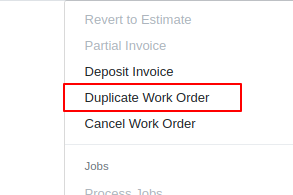
We’ve added the ability to duplicate Work Orders. To duplicate a Work Order, go to the Actions dropdown → Duplicate.
When duplicating, the system copies:
Opportunity
Service Managers noted that when adding jobs directly from the New Work Order form, the warranty customer input is not available. This caused warranty jobs to have no customers, leading to incorrect pricing and forcing staff to re-enter parts and labor.
Solution
We’ve added a Warranty Customer input to the New Work Order form. This field only appears when the job category is set to Warranty
Opportunity
Technicians reported that when adding parts to a Work Order from the mobile view, the bin location was not visible. This forced them to leave the Work Order page and look up the item separately, slowing down the process of finding and picking parts.
Solution
The mobile Work Order view now displays the bin location for parts directly when they are added, allowing technicians to quickly locate items without leaving the Work Order.
Opportunity
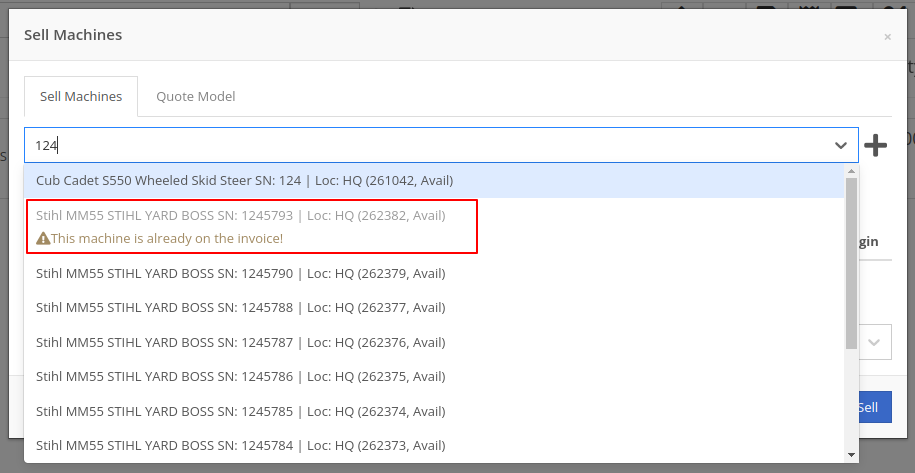
Sales Managers noted that when selling multiple machines on a Sales Order, the selection field did not clearly show which machines were already on the Sales Order. This made it difficult to avoid selecting the same machine twice.
Solution
We improved the Sell Machines tab by disabling machines that are already on Sales Order and displaying a message: “This machine is already on the invoice!”. This makes it clear which machines have been added and prevents duplicate selections.
Opportunity
Sales managers requested more control over who can save tax rule changes directly to customer records when working on Sales Orders.
Solution
We’ve added a new Access Control permission for the “Save To Customer” button on tax rules edit. Only users with this permission will be able to save tax rule changes back to the customer record.
Complaint: Rental Managers complained that Reservations tied to reserved Rental Contracts were showing up in the rental timeline view for conflicts alongside the Rental Contracts themselves, leading to confusion.
Correction: Reservations tied to Rental Contracts no longer appear in the conflicts list.
Complaint: Sometimes negative fee-only receiving vouchers failed to post to QuickBooks.
Correction: Fixed. These are now posted to QuickBooks as Vendor Credits.
Complaint: Managers purchasing machines noticed that the descriptions they set on the Machine Purchase Order were not carrying over to their machines once they were received.
Correction: Received machines will get their descriptions from the Machine Purchase Order, with a fall back to inherit the description of their model.
Complaint: Managers reported that they were seeing large negative margins on certain item dashboards, specifically for items that had configured purchasing units quantities (e.g. buying hose by the foot but selling it by the inch).
Correction: Margin calculations now properly account for purchasing unit quantities.
Complaint: Inactive items were showing up in the Parts Used search on the Work Order mobile view, even though inactive items should not appear. This did not happen in the desktop view, causing inconsistent results.
Correction: Fixed.
Complaint: Managers reported saving multiple accounting contact emails works fine on the Customer Edit page, but the next time they load the Customer Edit page only one of the emails are shown. This could lead to accounting contact emails being blown away the next time they save the Customer.
Correction: Fixed.
Complaint: The links on Customer Activity notifications to the Customer Dashboard in the My Notifications report were formatted incorrectly, making them unclickable.
Correction: Fixed
Complaint: Salespeople sending SMS Campaigns with an image attachment noticed some of their messages did not send as expected, and they saw some odd looking (very technical) errors in the Sent Messages details providing the reason why.
Correction: We’ve addressed an issue causing some SMS messages with images not to be sent, and improved clarity around how many SMS messages were attempted and how many sent or failed.
Complaint: When a customer signed a Work Order estimate requested via SMS, the system attempted to send an email to the customer’s phone number. Since phone numbers are not valid email addresses, this generated failed email errors.
Correction: The system has been updated to skip email sending for phone numbers when processing SMS estimate signatures, preventing invalid email attempts.
Complaint: Accountants noted that Machine Purchase Order Vouchers with a negative total would sometimes not post to QuickBooks Online when using a separate distributor currency.
Correction: Fixed.
Complaint: Managers using the “Consolidate Models” feature for their Sales Order PDFs reported their print outs were showing incorrect values for the Back Order column on model lines.
Correction: The back order column now shows a count of model lines that will generate purchase requests and have not been associated with a machine.
Complaint: Salespeople mentioned that when selling a Kit that contained a Model, the green dot "fulfill" action would appear on the Kit line. Clicking on this action would do nothing.
Correction: Fixed a visual bug where the action would appear incorrectly. It will no longer show when selling a Kit that contains Models.
Complaint: When managing parts on Work Orders, Technicians and Service Writers reported seeing backorder warnings when updating quantities of Non-Inventory Items.
Correction: Fixed.
Ivan is officially the Kansas City Chiefs of the Flyntlok league. After dominating last season, he has gone 0-2 this season. (Though in fairness, he lost this week by less than a point.) And poor Alex is 0-2 with a combined point differential of only -2.32. And Isabelle’s Taylor Swift-themed team surprisingly won.






