NEW!
Meet Flyntlok at Equip Expo 2026:
This release is all about giving equipment dealers more ways to shape Flyntlok, save time in the service lane (hint: AI now built in!), and turn customer data into revenue-driving outreach. From new ways to share product feedback to smarter tech notes, stronger campaign tools, and better mobile workflows, these improvements are all about making the day-to-day easier and more profitable across your equipment dealership. Strong start to Q3!
Plus, small plug here for our new social media profiles! Never miss an update again by following us on LinkedIn, Instagram, Facebook, and YouTube.
What’s New!
We're launching a series of office hours dedicated to specific areas of Flyntlok, giving you direct access to our product team to share feedback, ask questions, and help shape what we build next.
Sessions will cover:
Have thoughts on what you'd like to see in Flyntlok for any of these topics? Drop us a support ticket and we'll send you an invite to join the discussion with our dealer community for that session.
As always, THANK YOU for sharing your experiences with us… we love driving that feedback directly back into the product.
ICYMI: See our built-in, rapid Customer Support in action with Flyntlok Support Consultant JP Raiger, and learn more about the people, process, and high standards behind the industry’s fastest response times. Listen wherever you get your podcasts or here: https://www.flyntlok.com/events-webinars/flyntlok-unlocked-ep-4-the-industrys-fastest-customer-support.
By Bomby K.
What’s New!
After several rounds of consistently positive feed back on our alpha version of the feature, we’re moving to an open beta. If your service team would like to try out the new voice-to-text plug-in for both web and mobile, drop us a support ticket to be turned on. We’ll schedule a few options for office hours to see a demo, ask questions, and provide feedback. We do expect to extend this solution, so please don’t hesitate to provide feedback via the thumbs up/down and comment boxes embedded directly in the feature. We’d love to hear your thoughts!
Please see the AI-Powered Tech Notes support page for more detail and a visual walk-through of the solution.
By Alex E. [#88715]
What’s New!
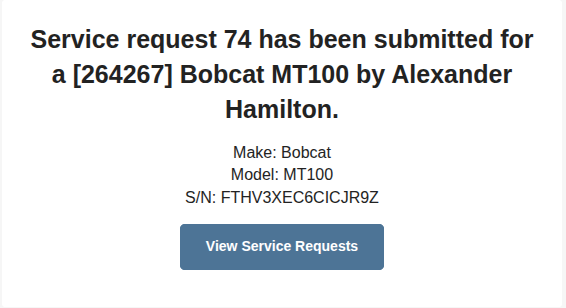
We have updated the SMS, email, and internal Flyntlok notifications for Service Requests to now include the associated machine make, model, and serial number.
Why It Matters:
Service Request Notifications (Confirmed, Approved, and Rejected) lacked request-specific details.
ICYMI: See our Service Module in action with Flyntlok Sr. Pre-Sales Consultant Alex Clementi, and learn more about the tools that find, retain, and keep customers coming back in the shop. Listen wherever you get your podcasts or here: https://www.flyntlok.com/events-webinars/flyntlok-unlocked-ep-3-growing-service-revenue.
By Bomby K.
What’s New!
Smart Campaigns is now generally available to all dealers; access is managed through your existing role-based permissions.
Target lists now surface customer tags and Google review ratings as filters, display richer customer data at a glance, and can be exported as CSV. You can inherit a target list from a previous campaign and filter by who responded. Campaigns can be scheduled for future send, previewed with a test message to yourself, and include a cost warning before high-volume blasts. Under the hood, we resolved every reliability issue from beta — bulk send timeouts, duplicate phone number handling, auto-response latency, message encoding, and daily data reindexing to keep targeting fresh.
Thank you to the many dealers who tested early builds, filed bugs, and told us what they needed. Your feedback built this. Smart Campaigns is broadly available now, but we'll keep enhancing it, so please keep that feedback coming.
Why It Matters:
Dealers already sit on a goldmine of customer data — purchase history, machine ownership, tags, even Google review ratings. Smart Campaigns turns that data into targeted, well-timed outreach without ever leaving Flyntlok. After an enthusiastic beta period where dozens of dealer partners helped shape the feature with hands-on feedback, Smart Campaigns is ready for everyone.
Full documentation is here: Smart Campaigns Guide.
By Bomby K.
What’s New!
Smart Campaigns can now be scheduled for future delivery directly from the Campaign Builder. Sales Managers pick a date and time during review, and the campaign automatically sends at the scheduled time. Once scheduled, a campaign's target list and messaging are locked to prevent accidental changes before it goes out, and the campaign grid clearly reflects its scheduled status.
Why It Matters:
Sales Managers building Smart Campaigns could previously send messages immediately, requiring them to be online at the exact moment they wanted a campaign to go out. This made it difficult to plan outreach in advance or time campaigns for optimal send windows.
By MA S.
What’s New!
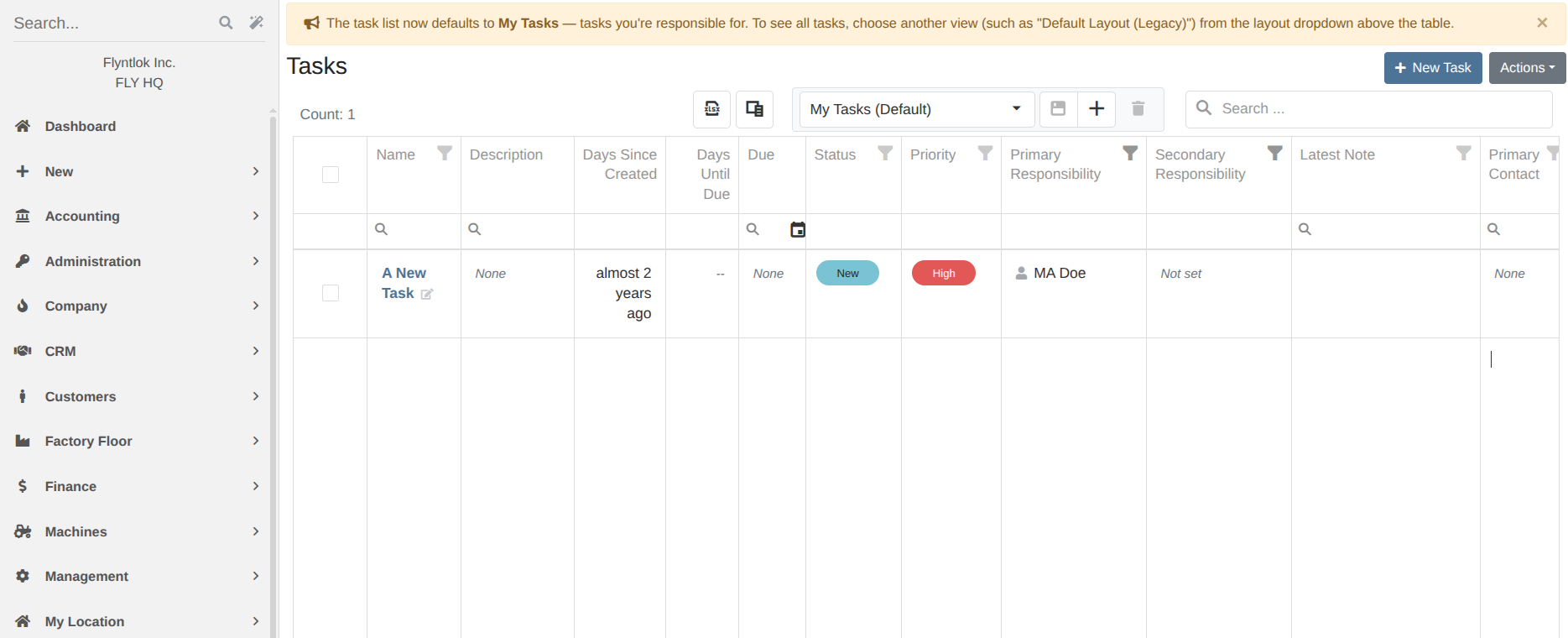
We have now updated the default filters to “My Tasks,” which will display only the Tasks the current user is associated with. The previous behavior can be switched to easily from the saved views dropdown in the toolbar. As always, you can create and save personalized views via the existing toolbar.
Why It Matters:
The legacy CRM Tasks grid defaulted to all company Tasks. We have found this often resulted in unnecessary interactions with the UI during common workflows.
By Bomby K. [#87259]
What’s New!
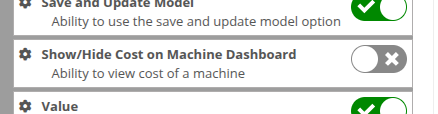
We've added a new "Show/Hide Cost on Machine Dashboard" permission. Only users with this permission will see the expand view, giving dealerships finer control over who can view sensitive pricing data. You can find this permission via the settings dropdown (Wrench Icon) -> Users -> Access Controls -> DMS -> Machine:
Why It Matters:
Sales Managers wanted the ability to restrict certain staff, such as salespeople, from viewing a machine's Cost, Margin, and Minimum List Price. Previously, anyone with access to the Machine Dashboard could expand the List Price row to reveal this financial detail, with no way to control access separately from the dashboard itself.
By Will P.
What’s New!
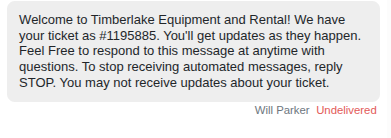
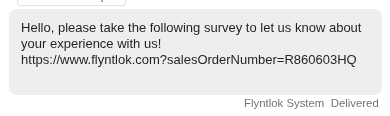
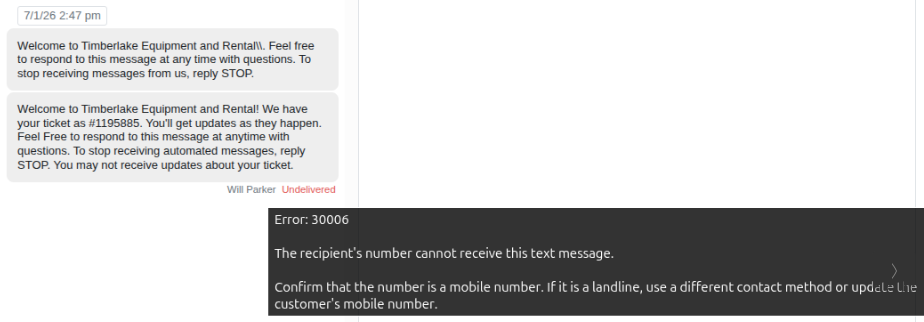
We’ve added SMS delivery statuses throughout the app so users can see the current delivery state of sent messages. Statuses are now visible in the SMS Inbox, Leads page, Sales Order page, Work Order page, Rental page, and Mobile view, giving users better visibility into customer communication. If a message didn’t deliver, you can reveal the error message details by hovering over the “undelivered flag”. Please note that this update will apply to all new messages going forward.
Why It Matters:
Users did not have a clear way to confirm whether outbound SMS messages were successfully delivered after being sent. This made it harder to understand message outcomes and follow up when a message failed or did not reach the customer.
By Ula L.
What’s New!
New Tasks created from the task list or a Customer page now automatically default their primary responsible user to whoever is creating the Task. The assignment can still be changed to a different team member before saving.
Why It Matters:
Salespeople and other CRM users had to manually select themselves as the responsible party every time they created a new Task, even though they were usually the one following up. This extra click added unnecessary friction to a routine action.
By Yasmine C.
What’s New!
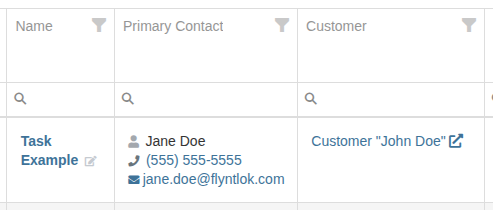
The Tasks grid now includes a Primary Contact column, matching the one already familiar from the Leads grid. This column shows the primary contact's name, phone number, and email for the Lead or Customer linked to each Task. Clicking the phone number opens a text conversation, giving Salespeople a faster way to follow up without leaving the Tasks grid.
Why It Matters:
Salespeople working from the Tasks grid had to open the linked Lead or Customer record just to find contact information before following up, adding extra clicks to routine outreach.
By MA S.
What’s New!
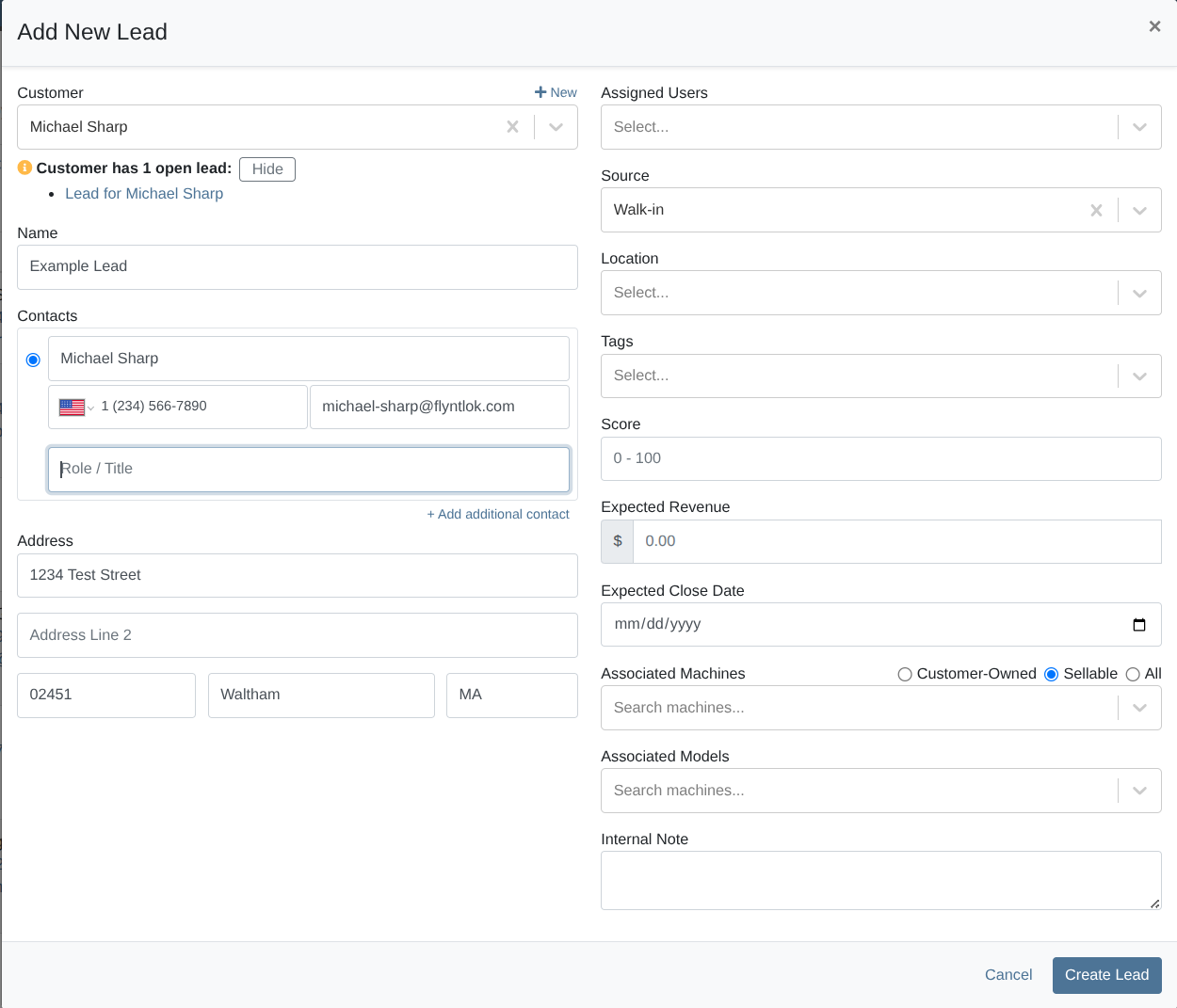
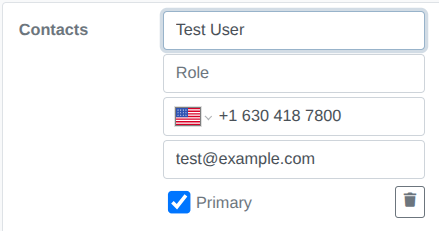
Creating a new Lead now allows for the assignment of a contact’s “role / title.” This will carry over to the Lead details page where it can also be edited. The Lead details Contact element on the sidebar has also been tweaked with clearer UI.
Why It Matters:
Salespeople should be able to see the “role” of the contact they have associated with a CRM Lead. This would allow for complicated deals to have multiple contacts in different departments at a potential customer.
By Calvin M.
What’s New!
We've overhauled our JDPoint integration, modernizing it to deliver a more reliable parts ordering experience. Purchase Order submissions to John Deere are now more dependable, and order status information remains visible directly from the Purchase Order page.
Why It Matters:
Purchasers submitting part Purchase Orders through John Deere's JDPoint integration occasionally encountered order submission failures and missing order status details. These intermittent issues made it harder to keep tabs on incoming parts and communicate accurate delivery timelines.
Interstate Billing Service (IBS) - Customer Edit Permissions
By Ben C. [#88785]
What’s New!
We’ve added a dedicated “Edit IBS Account Fields” permission to the Access Control page. Only roles granted by the manager with permission to edit these fields can do so. Otherwise, the fields are greyed-out and cannot be edited. This is enforced both on the Customer creation and Customer edit page.
Why It Matters:
Interstate Billing Service (IBS) is a third-party service that allows dealers to get paid at the time of sale while they handle collecting the payment by the agreed upon terms. Flyntlok has integrated directly with IBS to offer this service on our Point of Sale after a customer is set up with IBS account information.
Managers requested a new permission to only allow approved employees to change IBS fields on the customer edit and creation pages, just like they can do with accounting fields.
By Yasmine C. [#85997]
What’s New!
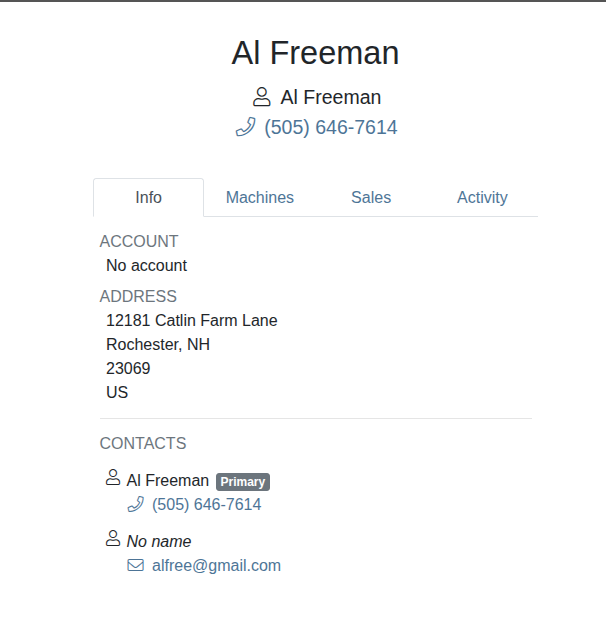
Customer contact information on mobile work orders now include a clickable phone number that automatically dials the number.
Why It Matters:
Service managers noted that even though customer phone numbers are displayed on mobile work orders, calling the number is inconvenient because it requires an extra step, dialling or copying and pasting the number into their phones.
By Christian E. [#63123]
What’s New!
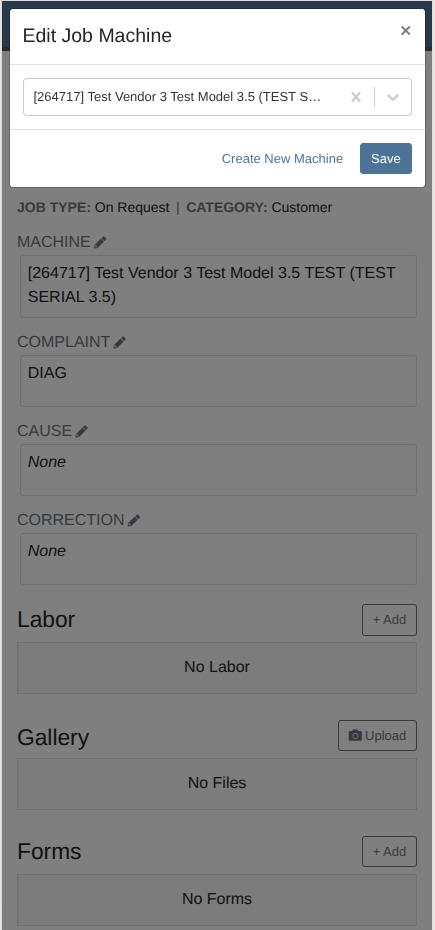
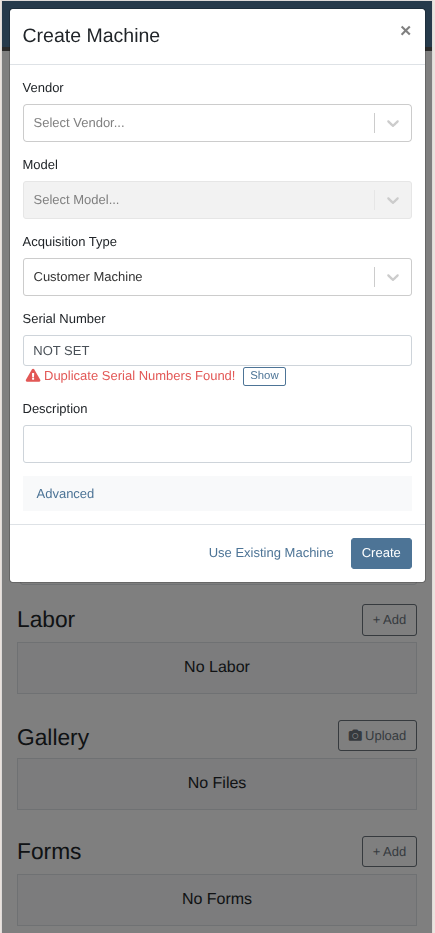
When clicking on the field to associate a machine to a work order job, you can now click to create a new machine.
Why It Matters:
Previously, it was not possible to create a new machine from the machine field on a job for a multi-machine work order from the mobile app. You were only able to search for existing machines.
By Yasmine C.
What’s New!
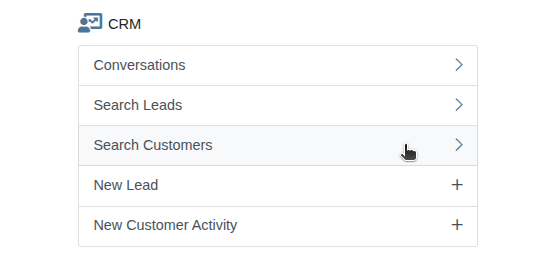
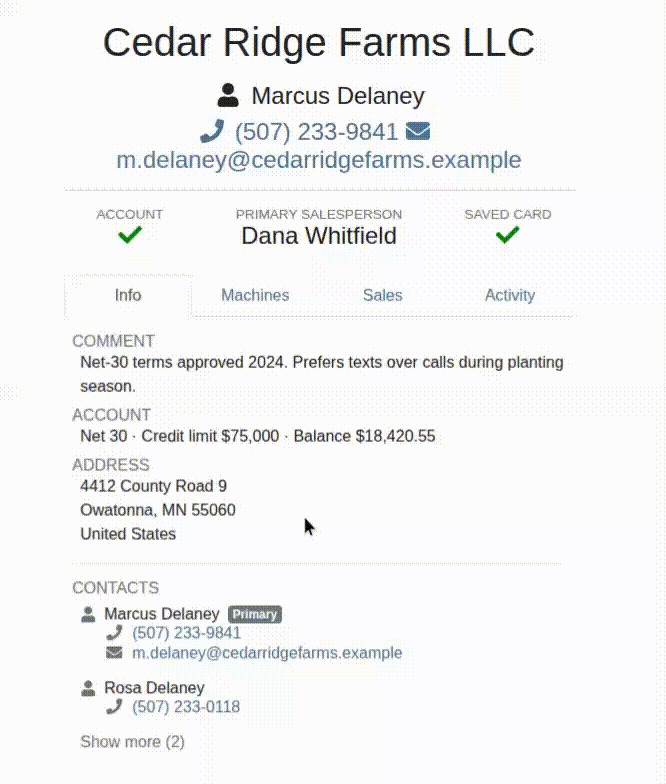
We added a mobile customer searcher and a mobile version of the customer dashboard which provides a snapshot of relevant customer information in a convenient and easy-to-scan layout made for mobile devices.
Why It Matters:
Sales staff need to be able to reference customer information on the go, and the desktop version of the customer dashboard is extensive and not suitable for viewing on a smaller screen.
By Christian E. [#79059]
What’s New!
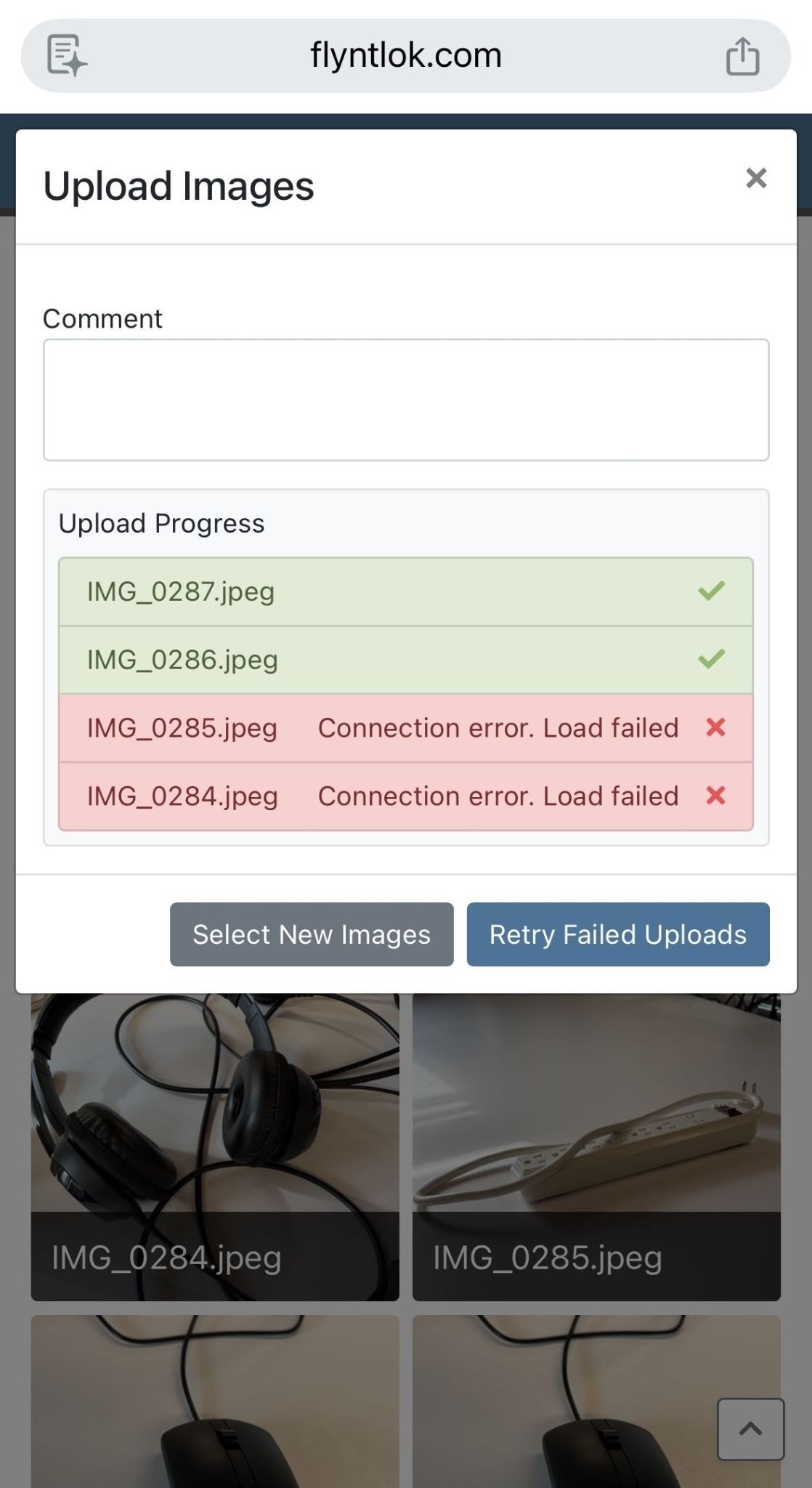
After a photo upload attempt, you now have the option to retry an upload for photos that have failed without having to manually reselect them.
Why It Matters:
When photos are uploaded from the mobile app, if any of the photos failed to upload, the user needed to manually search for the failed photos again and retrigger an upload.
By Calvin M. [#89260]
What’s New!
The due date on Part PO Receiving Vouchers now automatically recalculates when the invoice date or vendor’s terms are changed. Updating either field will calculate the due date as the invoice date plus the vendor’s term length (e.g., Net 45), eliminating manual date math and reducing incorrect due dates flowing into accounting solutions. Currently supports net terms.
Why It Matters:
Managers and receivers entering details on Part PO Receiving Vouchers had to calculate and update the due date manually whenever they changed the invoice date (or vendor terms) to match the actual vendor invoice. This could lead to incorrect payment timelines and extra manual effort.
By Bobby S.
What’s New!
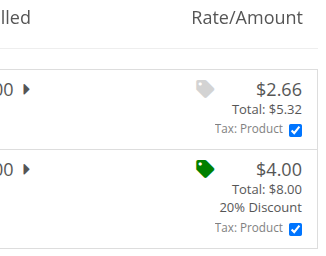
We've updated the discount indicator on the Point of Sale page to make it easier to spot discounts at a glance. The dollar sign icon has been replaced with a tag icon, but it still changes color based on whether a discount is applied:
Why It Matters:
Same functionality as before, just a cleaner visual that makes it quicker to see where discounts are in play.
By Graham R. & Nick V.
What’s New!
Why It Matters:
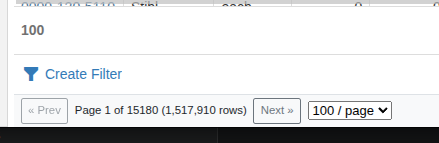
You may recall that we focused very intentionally on performance and stability back in the fall. While we have shifted towards a strong focus on new functionality we have not lost sight of the impact of performance and stability on the day-to-day operations of all our dealers.
Previously reports with hundreds of thousands to millions of rows would challenge the servers and other pages resources. These recent changes:
By Alex E.
Complaint: The Upcoming Maintenance page did not have an export button like similar pages.
Correction: We have added an export button to the page.
By Ben C.
Complaint: Customer requested a report which shows all parts currently on order. They were directed to the “All Parts On Order - All Company” report, which has now been enhanced with a column listing the order type (Purchase Order or Return).
Correction: Added a column to the column chooser which displays whether or not the item is on a purchase order or a return.
By Ben C.
Complaint: Dealerships in Utah must provide the State Tax Commission’s TC-466 form for motor vehicle sales. It discloses transaction information including sale price and associated fees. Utah issued a new version of this form with a revised layout and calculations. This form needed to be revised before the mandatory deadline of July 1, 2026.
Correction: We’ve replaced the TC-466 form with the updated version. It is available on Sales Orders under the Details tab. It can autofill the customer, salesperson, taxes, and fees into their matching sections. Changes per dealership are required to effect this change; outreach to affected dealerships is underway.
By Nick V.
Complaint: Service Managers reported that the Estimated Hours column on the Service → All Work Orders report displayed inflated values for some Work Orders, while the Work Order itself showed the correct total.
Correction: Fixed. The Estimated Hours column on the All Work Orders report now correctly reflects the sum of estimated hours from each Work Order's jobs, matching the value shown on the Work Order itself.
By Nick V.
Complaint: Salespeople reported that the customer information panel on Sales Orders frequently appeared partially collapsed, obscuring customer details and making it difficult to change the Sales Order’s Customer.
Correction: Fixed behavior where the browser would scroll the panel content when the Customer drawer was opened. It should now open fully with the Customer input automatically focused.
By Nick V.
Complaint: Service Writers reported being unable to create new ERP Work Orders, receiving a "Something went wrong when creating the work order" error.
Correction: Fixed. Added missing permissions which were preventing ERP Work Order creation in some cases.
By Calvin M.
Complaint: When submitting an Invoice to Toro through TTC Data Link to register a Machine, traded-in Machines on the Invoice were incorrectly included in the registration request. This caused the traded-in Machine to be registered under the purchasing Customer rather than only the sold Machine.
Correction: Fixed. Trade-in Machines are now excluded from TTC Data Link registration submissions, ensuring only sold Machines are registered to the Customer.
By MA S.
Complaint: CRM Lead Status requirements for updates can be controlled by a Flyntlok configuration that requires a “reason” to be entered before submission. Customers who had this turned off were always required to submit a “reason” on mobile views.
Correction: The Lead Status update view on mobile now properly respects the Flyntlok configuration and will not require a “reason” if turned off.
By Bomby K.
Complaint: Managers reported that when viewing a Model, the totals calculated in the "All Sales" section appeared to show incorrect counts and totals.
Correction: Fixed a bug where deleted sales records were sometimes being factored into model sales totals.
By Bomby K.
Complaint: Service Writers mentioned that when using Work Order Dashboard, they were not able to search for a contact while making edits within the Info tab.
Correction: Fixed.
By Bobby S.
Complaint: Accountants reported that check payments tied to multi-payment Sales Orders could appear twice on the Z Detail report, making end-of-day payment totals look inflated.
Correction: Fixed. Multi-payment child lines are now excluded from the Z Detail report so check payments are displayed once with the correct total.