NEW!
Meet Flyntlok at Equip Expo 2026:

Dear Reader, you will notice fewer features have been released over the past few weeks, and that will continue through the end of the year. Flyntlok is focusing almost exclusively on two main endeavors:
Join us for a webinar on Tuesday, December 9th at 3PM EST focusing on Flyntlok's new AI features. Register for the event here: https://www.flyntlok.com/frictionless-ai-a-dealers-advantage-webinar/
Opportunity
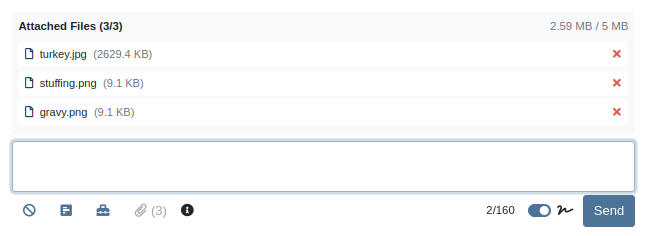
Service and sales teams wanted to attach multiple files to a single SMS message from the SMS Hub instead of adding them one-by-one.
Solution
You can now send multiple images in a single SMS conversation. Attach up to 3 images per messagewith a combined size limit of 5 MB. This streamlines sharing equipment photos and other visuals in one go.
Opportunity
Management identified that quick access to new lead creation is essential for maintaining efficient sales workflows. The previous process required too many steps, slowing down users who needed to capture leads on the spot.
Solution
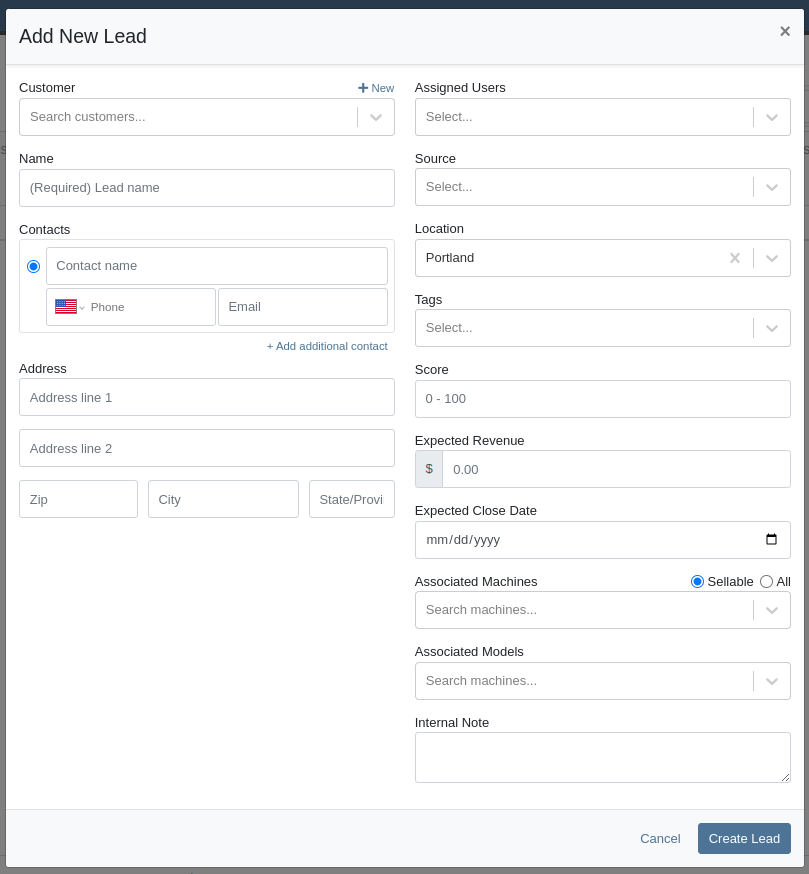
We've added a “New Lead” button directly to the navbar. Selecting it takes users to the “All Leads” page with the “New Lead” form already open, giving teams immediate access to lead creation and reducing unnecessary navigation.

We also updated the layout of the lead creation form to make it cleaner and easier to work with.
Opportunity
Usage data showed that the Documents page and Signature Hub were accessed infrequently compared to other navbar items. Keeping them in the top navigation added unnecessary clutter and made it harder for users to focus on the tools they rely on most.
Solution
We removed both Documents and Signature Hub from the navbar and relocated them to more appropriate sections. The Documents page is now available under Administration → Documents. Signature Hub is no longer enabled by default, but it can be added, just reach out through our regular support channels and we'll get it set up.
Opportunity
Following the recent addition ofGoogle Review associations, many users (and Justin) requested the same capability for Facebook Reviews. Sales and customer service teams wanted a unified way to connect social feedback from multiple platforms directly to their customers, providing a fuller view of customer sentiment right from the CRM.
Solution
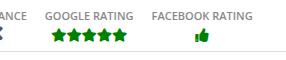
You can now associate customers to a Facebook review. Building on our recently-releasedGoogle Review associations feature, linking a customer can be done from the CRM Reviews page, and immediately becomes visible on the Customer Dashboard:
Opportunity
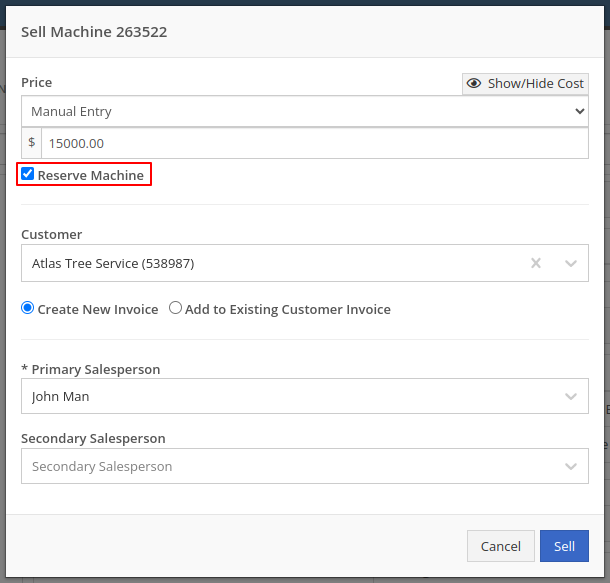
Sales managers needed a faster way to reserve multiple machines when quoting or selling, without opening each machine record individually. This helps prevent double-selling while a quote is pending approval.
Solution
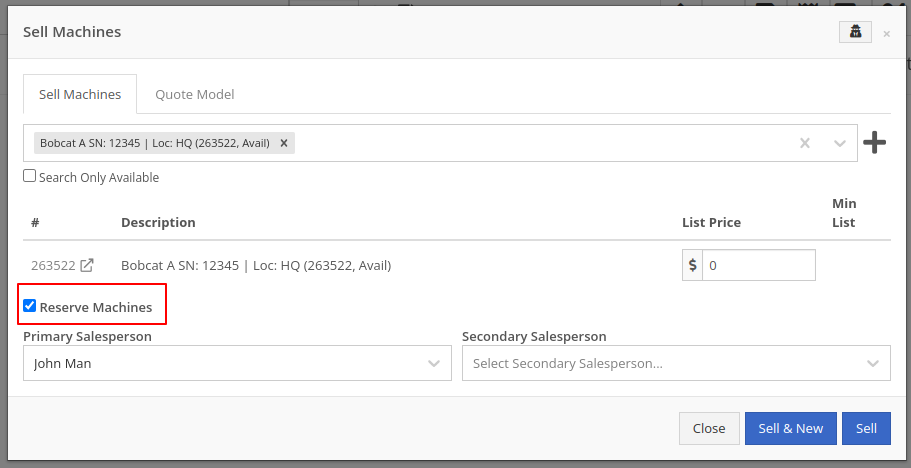
We added a Reserve Machines checkbox to the “Sell Machines“ form (including the “Sell Machine” action on the machine dashboard). When checked, Flyntlok will create reservations for all selected machines in one step. These reservations are set for 7 days from the sale date and automatically set the machine status to On Hold.
Opportunity
Sales managers requested the ability to hide kit sub-items on thermal receipts.
Solution
We've expanded the existing “Hide Kit Items on Sales Order PDF” setting to also apply to thermal receipts. When enabled, kit sub-items will be hidden on Sales Order PDFs and thermal receipts. To enable this feature, go to Flyntlok Settings → Reports → Hide Kit Items on Sales Order PDF and Thermal Receipt.
Complaint:When scanning a kit barcode, only the parent kit item was added, and its sub-items were not included automatically.
Correction:Kits are now fully supported on the barcode scanner. Scanning a kit barcode will correctly add all associated sub-items to the order.
Complaint:Sometimes for multi-currency tenants, after editing a Return of Goods, the PDF would display all costs as 0.00.
Correction:Fixed.
Complaint:Accountants reported that sometimes, when updating a Credit Memo in QuickBooks, it would recalculate some of the lines and move out of sync with the original Sales Order in Flyntlok.
Correction:Fixed. This could occur when an item with negative unit price was submitted on a Credit Memo, which will now correctly be respected.
Complaint:Move completion notifications sometimes failed to send, causing users to miss important status updates.
Correction:Fixed.
Complaint:Sometimes when a Work Order split into customer and warranty invoices, the warranty invoice did not include the complaint, cause, or correction notes on the warranty job line.
Correction:Fixed.
Complaint:Users could fill out the machine move form, but clicking Request Move did nothing. The issue was caused by missing phone-number validation on the Move From contact field, leaving the form in an invalid state without showing an error.
Correction:Fixed. Phone validation now displays properly on the UI, allowing users to see and correct the issue so the move request can be submitted.
Complaint:Users were unable to close certain vouchers even though the front end showed a zero balance. Attempts to close the voucher triggered an error indicating it wasn't actually balanced.
Correction:Fixed a rounding issue that caused hidden balance discrepancies. Vouchers now close properly when the displayed balance is zero.
Complaint:The BOM Entries page was using an old sidebar layout, and the entry order didn't match the order shown on the Work Order BOM view, causing confusion.
Correction:Updated the sidebar to the current UI and aligned the entry ordering so it matches the Work Order BOM view.
Complaint:When entering QBO accounts on a vendor, the account numbers no longer appeared on the vendor edit page.
Correction:Fixed.
Complaint:CSV and Excel exports were converting ampersands (&) into HTML entities (&), causing exported data to display incorrectly for customers.
Correction: Fixed. Exports now preserve the original & character without converting it to HTML.
Complaint:Technicians reported needing to switch to “Show Completed” before being able to see Work Orders they were assigned at the Work Order level and not the Job level.
Correction: Fixed.
November 5th, 2025 Release Notes
Schedule a demo to learn more.
Check out ourFlyntlok YouTube channel for more highlights of the application!