Item Dashboard

What each number on Flyntlok's item dashboard means: bin, quantity on hand, on order, to target, and sales over the last 90 and 365 days.

  • Published
    February 19, 2021
  • Updated
  • By
    Dylan Timberlake

Newer guide available

This guide shows older screens. Use the newer guide for today's steps.

Read the newer guide
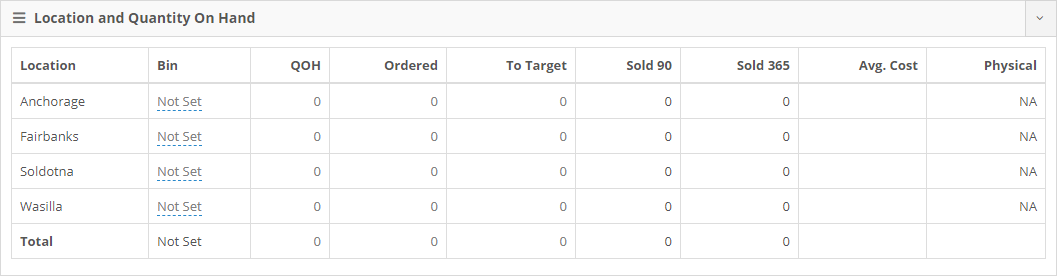
Location and Quantity On Hand table on the item dashboard
  • Bin: Shelf location of the part at the store.
  • QOH: The current amount that the location has.
  • Ordered: Total amount that is on order for the location.
  • To Target: How many the store should buy/sell to hit the target QOH.
  • Sold 90: How many the store has sold in the past 90 days.
  • Sold 365: How many the store has sold in the past year.
  • Avg. Cost: The average cost of the item.
  • Physical: The date and user name of the last person to manually adjust QOH.

Still stuck?

Our support team answers in minutes.

Click the ? icon anywhere in Flyntlok to open a ticket. A link to the page you're on goes with it, so you don't have to explain where you are.

8/8 Support Guarantee

Response in 8 minutes. Solved in 8 hours.

Real people on the Flyntlok team, not a ticket queue.