WATCH HERE:
Our Equip Expo AI Session is Now On-Demand!
There’s a newer version of this video. This one stays up for reference, and it no longer shows on product pages or in the library.
Watch the newest versionTechs talk through the job. AI writes the Complaint, Cause and Correction.
Bomby Kitchpanich, Senior Software Engineer at Flyntlok, records 30 seconds of shop-floor rambling on a work order. Smart Tech Notes turns it into a clean Complaint, Cause and Correction in about five seconds, jargon and specs included.

Plays right here. No form to fill out.
This clip comes from Flyntlok Unlocked, Ep. 8, which aired in September 2026. Host Jenny Moebius talks with Bomby Kitchpanich, Senior Software Engineer at Flyntlok, whose background spans software, cybersecurity and applied AI engineering, including the technology behind Smart Tech Notes.
Bomby opens a work order, hits the AI voice notes button and talks through a 1,000-hour service and an AC repair the way a tech would, shorthand, ums and all. Then he shows what came back and explains why it's more than voice to text.


Every update below shipped after this video was recorded. Each one links to its release notes.
Bomby Kitchpanich demoed Smart Tech Notes on a live work order.
The Job Notes window at clock-out now has voice recording and Improve with AI, on desktop and mobile Work Orders.
Technicians can dictate or type notes in Spanish, or mix in English shop terms, and get clean English write-ups.
AI Review flags fluids, grease and shop supplies mentioned in the notes but missing from the parts list, before invoicing.
Flyntlok ships a release every two weeks. See every release note
Jenny opens on technician time, one of the most valuable resources in any equipment dealership. Documentation matters, because you need good service records to do business, but every minute a technician spends stopping to type is a minute they aren't turning a wrench. Multiply that across every tech, every work order and every day, and a small administrative task starts consuming real shop capacity.
Bomby's simplest explanation: it's a voice-powered AI feature. A technician speaks into the microphone about what they did, and out comes a well-formatted, cleaned-up write-up a service writer can use.
On the work order, technicians now have an AI voice notes button where they'd normally type the Complaint, Cause and Correction. Bomby hits record and talks for about 30 seconds the way a tech might: 1,250 on the meter, in for an overdue 1,000-hour service. Engine oil and filter with eight quarts of 15W-40, both fuel filters, a loaded-up air filter swapped out, hydraulic oil and the return filter, front and rear diffs and the transfer case with 80-90, and everything greased. Then the AC: the customer said it wasn't cold, it was low and leaking at the Schrader valve on the high side, so he replaced the valve, charged it to the nameplate 2.4 pounds of R-134a and checked 38 degrees at the vent.
About five seconds later, Flyntlok had a Complaint, Cause and Correction, with the rambling turned into a bulleted list. It recognized 8090 as an oil rating and formatted R-134a to match AC refrigerant types, which takes service-level knowledge. The write-up can go straight to a service writer, who can present it to the customer.
The button works the same on desktop and mobile. Field technicians who go out to the customer, and techs issued tablets or phones by their shop, can document the job where they are instead of walking back to a laptop.
Jenny asks the obvious question: voice to text has existed forever. If a service writer still has to clean up a messy transcript, the admin work just moves from one person to another. Bomby explains that transcription is word for word. Smart Tech Notes adds a layer of AI that acts like an expert in the service domain, understanding how technicians talk and how service writers want write-ups to look. It handles jargon, oil ratings and abbreviations, filters out bad language and personally identifiable information like employee or customer names, and drops filler words and restarts while keeping part numbers, serial numbers and torque specs.
Techs talk through the job and Flyntlok AI writes it up. The machine, labor, parts and photos stay on one work order, and the Service Dashboard shows which hours got billed.
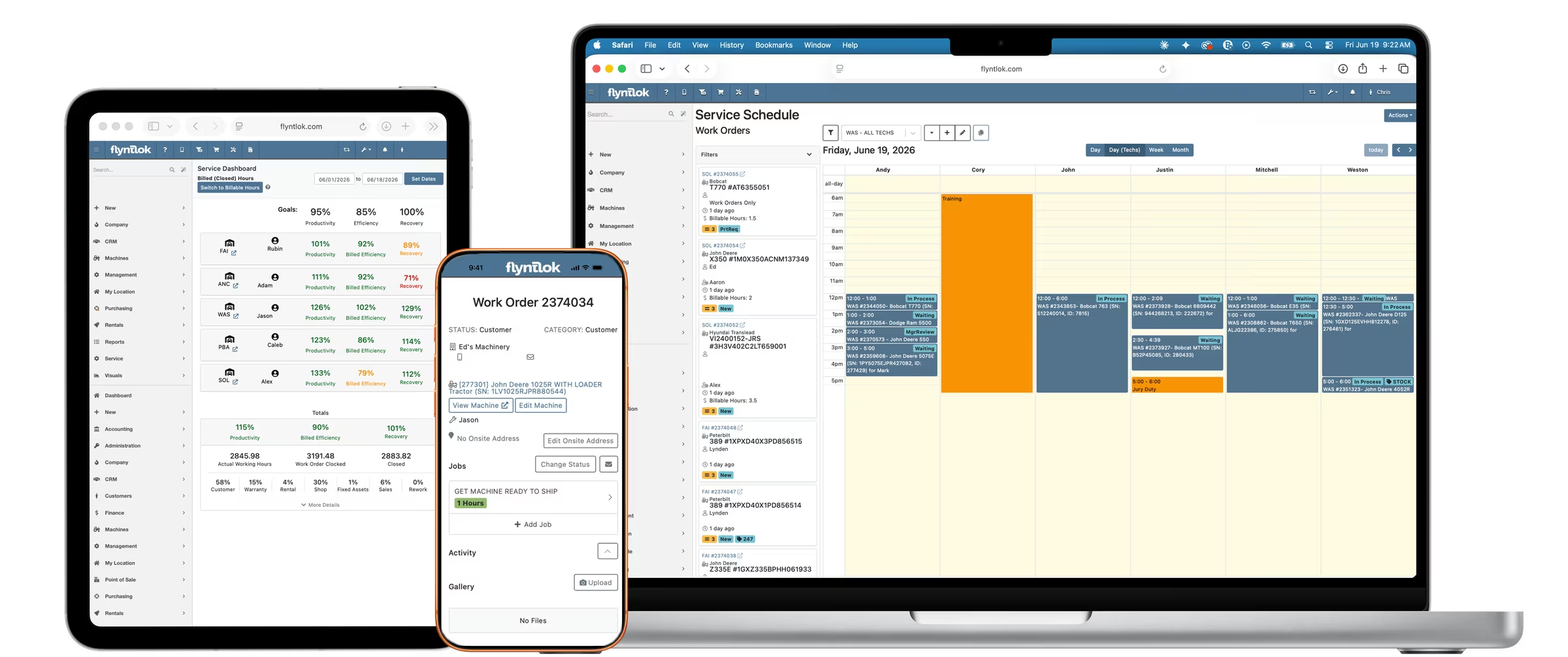
An AI feature on Flyntlok work orders. Technicians record what they did in their own words, and Flyntlok writes a clean Complaint, Cause and Correction a service writer can use.
Voice to text types out exactly what you said. Smart Tech Notes acts like a service expert: it understands shop jargon and abbreviations, drops filler words and restarts, filters out bad language and personal names, and formats the write-up the way service writers want it.
Yes. The same button is on desktop and mobile, so field techs and techs with shop tablets or phones can document a job where they work.