WATCH HERE:
Our Equip Expo AI Session is Now On-Demand!

August 3, 2026
Equipment Dealer Service Management Software | Flyntlok DMS: Service management software for equipment dealers. Full shop pipeline from check-in to invoice with technician tracking, warranty claims & real-time KPIs.
Service scheduling software coordinates who does a job, when, and with what resources, by tying appointment timing to technician availability, parts status, and work order progress. For an equipment dealership, whether a simple scheduler is enough or you need something more connected depends on one deciding factor: how many departments that schedule actually touches. A single-technician mower shop has different needs than a multi-location dealership juggling service, parts, rentals, and accounting.
Most dealers who search for this topic are not starting from a blank slate. They are running a whiteboard, a shared calendar, a standalone scheduling app, or a legacy dealer management system that never fit the way the shop actually works. Industry writing on field operations points to the same pattern outside dealerships too: many companies still rely on spreadsheets, whiteboards, or generic scheduling tools that do not integrate with the rest of the business, according to CrewOS, a field service scheduling vendor (crewos.io, 2025). That disconnect is the real starting point for most software evaluations, not a lack of awareness that scheduling tools exist.
This guide stays narrow on purpose. Instead of listing every feature every vendor offers, it focuses on the decisions that matter for heavy equipment, agriculture, and outdoor power equipment (OPE) dealers: which category of tool fits your complexity, what to check before a job hits the calendar, what implementation actually requires, and where a standalone scheduler stops being enough.
Service scheduling software is different from a calendar app because it does not just hold a time slot open, it confirms that a job can actually happen at that time. That means checking technician skill and availability, work order status, and often parts or tool readiness before a booking is considered final. Calendar tools tell you when someone is free; scheduling software tells you when a job is actually ready to run.

In a dealership, this distinction matters because a job is rarely just "book a technician." It usually involves a customer request that becomes a work order, a technician assignment that depends on certification, and a completion step that has to hand off cleanly to invoicing and reporting. Software that only manages the calendar leaves those connections to be tracked manually, usually in someone's head or in a side spreadsheet.
The workflow generally runs in a consistent order: a customer request comes in, it becomes a work order, a technician is assigned based on skill and availability, parts or tools are confirmed, an appointment window is set, the job is completed and documented, and the work order closes out to invoicing and reporting. Each handoff is a place where a schedule can quietly become wrong if the software does not check it.
Consider a scheduling decision that plays out at a mid-size OPE dealership. A landscape contractor calls Tuesday morning needing a zero-turn mower's deck spindle replaced before a Saturday job. The service coordinator opens a work order and checks three things before touching the calendar: which technician is certified on that mower brand, whether the spindle is in stock or needs an OEM order, and which bay has open time that week.
Say two technicians are certified on that brand. One is booked solid through Thursday; the other has a two-hour opening Wednesday afternoon. The spindle shows in stock in the parts system. Because technician skill, parts, and bay time all clear at once, the coordinator books the job for Wednesday at 1 p.m., rather than defaulting to Thursday to balance workload, which would miss the customer's Saturday deadline. If the part had needed a three-day order instead, the correct move would be to schedule the job for the earliest date matching parts arrival, not the earliest open calendar slot. That is the practical difference between calendar-style booking and service scheduling: the schedule reflects readiness across departments, not just an open time slot.
A dealership service department is usually managing more moving parts than a typical home-service appointment. An OPE dealer alone can carry thousands of SKUs across multiple OEM brands, such as Stihl chains, Husqvarna blades, John Deere belts, and ECHO trimmer heads, according to Flyntlok's product pages (flyntlok.com/features/equipment-dealer-ai). That parts complexity feeds directly into whether a job can be scheduled at all, since a technician assigned to a repair without the right part in stock is a wasted appointment slot.
Seasonality adds another layer. Spring brings a surge where homeowners and landscape contractors all need equipment serviced, parts ordered, and new units on the floor at the same time, per Flyntlok's dealer-facing pages (flyntlok.com/features/equipment-dealer-accounting-software). Heavy equipment and agriculture dealers face similar seasonal spikes tied to planting, harvest, or construction cycles. A scheduler that cannot flex bay capacity and technician load around a predictable surge will create backlog regardless of how polished its calendar view looks. The takeaway: dealership scheduling has to account for skill, parts, bay capacity, and seasonal demand together, not as separate problems.
The terms in this space overlap on purpose in a lot of vendor marketing, which makes it hard to know what you actually need. Appointment scheduling, dispatch software, service scheduling software, field service management (FSM) software, IT service management (ITSM) tools, workforce management tools, and a full dealership management system (DMS) all touch scheduling, but they solve different depths of the same problem. The table below is a starting point for narrowing the category before you start comparing vendors within it.

Read the table as a filter, not a ranking. If your operation only needs the leftmost columns to be true, you likely do not need the rightmost category, and paying for one anyway adds configuration overhead without adding value.
A standalone scheduler can be the right call for a small team with low job complexity: one or two technicians, straightforward repairs, and few dependencies on parts inventory or accounting handoffs. If most jobs do not require checking stock before booking, and there is no rental fleet or multi-location capacity to coordinate, a simpler tool avoids paying for connections you will not use. The signal to watch for is growth: once a second location, a rental fleet, or a parts backlog starts creating scheduling conflicts, the standalone tool tends to reach its limit quickly.
Once service, parts, sales, rentals, and accounting all depend on the same job, a standalone calendar starts creating more coordination work than it saves. This is the situation many equipment dealers are actually in: a rental return has to trigger an inspection, generate a work order, pull parts, and post to the general ledger, according to Flyntlok's rental management page (flyntlok.com/features/equipment-dealer-rental-management). If those steps live in separate systems, someone has to manually re-enter or reconcile them, which is exactly the kind of gap that creates scheduling errors in the first place.
Flyntlok's platform is built around unifying sales, service, parts, and rentals in one connected system, per its homepage (flyntlok.com), rather than treating scheduling as an isolated calendar bolted onto other software. That is a relevant reference point for dealers evaluating whether their next system needs to be a scheduler or a connected DMS, though the right answer still depends on your own department dependencies, not on any single vendor's framing.
Before comparing vendor demos, it helps to know which features are load-bearing and which are extras. For a dealership, the essentials tend to cluster around visibility (who is available, what is booked), readiness (parts, tools, bays), and connection (to work orders, billing, and reporting). Anything beyond that is a "nice to have" until your operation grows into needing it.
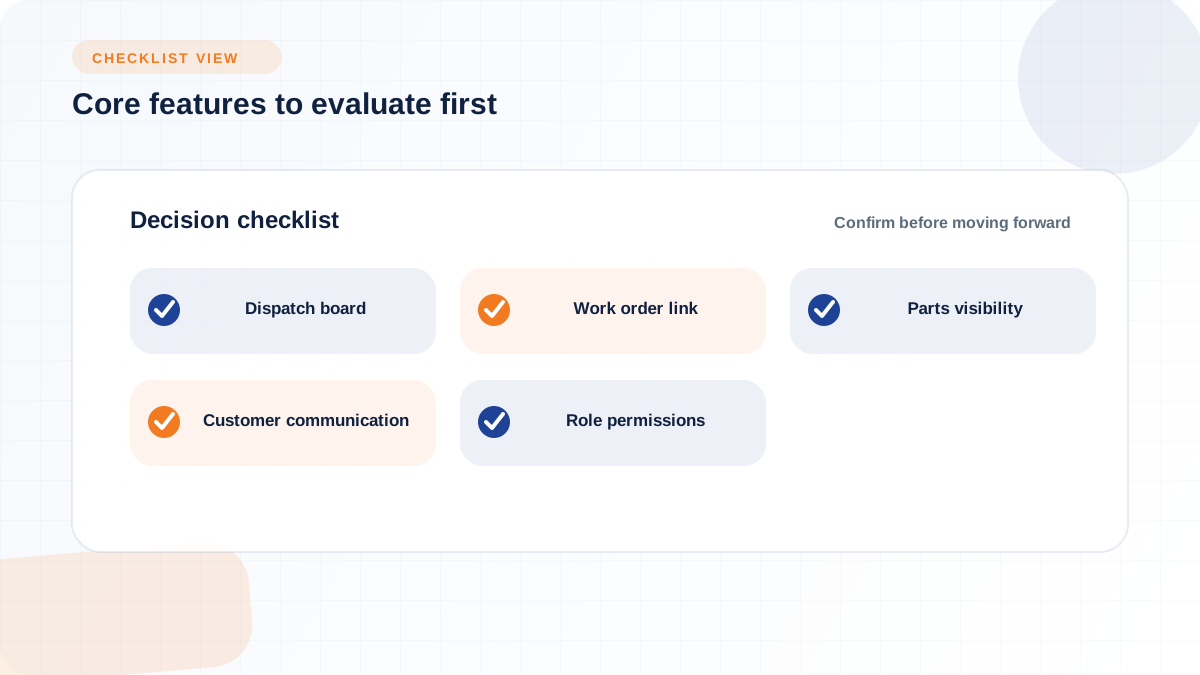
At minimum, evaluate a candidate tool against these criteria:
None of these features matter in isolation. A dispatch board with no parts visibility just moves the same rescheduling problem to a nicer interface. The value comes from how connected these pieces are to each other, not from how many boxes a features page checks.
Good scheduling decisions are really a set of constraints being checked at once: technician skill and certification, realistic job duration, travel time between stops, emergency priority, customer appointment windows, overtime limits, required tools or equipment, and service territory. A tool that ignores any one of these will eventually book a job that cannot actually be completed as scheduled, which shows up later as a reschedule, an overrun, or an unhappy customer. The practical evaluation question is not "does it schedule jobs," it is "which of these constraints does it actually check before confirming a booking."
Booking a job before parts, tools, or bay capacity are confirmed is one of the most common causes of rescheduling in service operations. Automated conflict detection that flags a technician being double-booked, or a job scheduled without the necessary equipment, is a feature explicitly called out by field service vendors as a fix for this exact problem (crewos.io, 2025). In a dealership, that same logic needs to extend to parts: a job scheduled against a part that has not been confirmed in stock creates the same failure mode as double-booking a technician.
This is where a scheduler tied to the same inventory record the parts counter uses has an advantage over one that treats parts as a separate lookup. Flyntlok's parts engine, called the Item Genome, surfaces quick picks by make, model, and customer history so a technician or coordinator sees availability in the same place the work order is being built, per Flyntlok's feature documentation (flyntlok.com/features/equipment-dealer-rental-management). The decision rule for evaluating any tool on this point: if checking parts status requires leaving the scheduling screen, that gap will get skipped under pressure, and skipped checks are exactly what create last-minute reschedules.
Who can edit the schedule, and under what conditions, is a governance question that gets overlooked until something goes wrong. Without role-based access, a well-meaning override by the wrong person can quietly break a customer commitment or double-book a bay that was already reserved for a different job. Flyntlok's cloud architecture includes role-based access controls that define exactly who can see what data and take what actions, according to its feature pages (flyntlok.com/features/equipment-dealer-rental-management), which is the kind of control worth confirming with any vendor regardless of which platform you choose. The evaluation question to ask is simple: can you see who changed a scheduled job, when, and why, or does an override just silently overwrite the previous plan.
Moving off a whiteboard, spreadsheet, or outdated legacy system is less about the software switch and more about the workflow it is replacing. Dealerships that skip mapping their current process before buying tend to end up reproducing the same informal workarounds inside new software, just with a nicer interface. The sequence that tends to work: audit the current workflow, clean up data, plan integrations, run a pilot, train dispatchers and technicians, and review adoption before rolling out fully.
A useful four-step framing from monday.com's guidance on service scheduling implementation is to design workflows first, including informal steps and workarounds, then configure the platform with core features before layering in advanced capabilities, then onboard teams, then use analytics to review performance once the system is live (monday.com, October 2025). That order matters because configuring a tool before understanding what it needs to replace usually means rebuilding the configuration later anyway.
Before comparing vendors, document how scheduling actually happens today, including the parts nobody wrote down. That means the informal steps, the exceptions a dispatcher handles from memory, any shadow spreadsheet that exists because the "official" system does not do what the team needs, and the recurring bottlenecks that show up every busy season. This mapping exercise usually surfaces which department handoffs are the real source of scheduling pain, whether that is parts confirmation, technician certification tracking, or accounting sign-off on completed work. Skipping this step means you are choosing software against an assumption of how work happens, not how it actually happens.
Data migration gets the attention, but adoption is usually the harder problem. Dispatchers often carry tacit knowledge, like which technician actually prefers certain job types or which customers need extra lead time, that does not exist in any spreadsheet column and has to be captured deliberately during rollout. Communication habits matter too: roughly 40% of employees still depend on email to receive scheduling information, according to field service scheduling research published by FieldServicely (fieldservicely.com, updated April 2026), which suggests a new system needs a clear, deliberate switch-over rather than assuming everyone will stop checking their inbox on day one.
The bigger risk is partial adoption: if service starts using the new scheduler but parts, accounting, sales, or rentals keep their old habits, you end up with two sources of truth and more manual reconciliation than before the switch, not less. Training plans should cover every department the schedule touches, not just the dispatchers who will stare at the calendar all day.
Pricing conversations for scheduling software usually split into two buckets: what the software itself costs, and what it costs to get it actually running well. On the first bucket, per-seat pricing is common in the broader market: monday.com's own service scheduling comparison lists monday service starting at $26 per seat per month billed annually, Jira Service Management at $7.53 per user per month on its standard plan, Zendesk at $19 per agent per month billed annually, and Freshservice at $29 per agent per month (monday.com, October 2025). Per-seat pricing can get expensive quickly for a dealership that scales staff up for seasonal service surges, since license costs rise every time you add counter staff or technicians during peak months.
Flyntlok uses per-user pricing, with current pricing available directly from the company. Flyntlok also states that its cloud model has no upfront hardware, server-maintenance, or annual-upgrade charges, that QuickBooks Online is available at a discounted rate through its certified Intuit reseller partnership, and that onboarding includes OEM integration setup, accounting sync, and data migration. These are useful comparison points, but buyers should model users, modules, implementation, integrations, training, and support across every shortlisted vendor.
The second cost bucket, the one competitors rarely spell out, is implementation: data cleanup, integration setup, dispatcher and technician training time, and the temporary productivity dip while people adjust to a new workflow. None of that shows up on a pricing page, but it is real time and real cost, and it is worth asking any vendor directly how they support it rather than assuming it is included.
Before assuming software will pay for itself, it helps to name where the value is actually expected to come from. A short set of questions can clarify whether the case for buying is strong or speculative:
None of these questions need a perfect number to be useful. Even rough estimates, tracked before and after a rollout, give you a defensible basis for whether the software is delivering the value you expected, rather than relying on a vendor's general efficiency claims.
Scheduling software gets sold on efficiency, but efficiency taken too far creates its own problems. Maximizing technician utilization sounds like a clear win, but a schedule packed with no buffer for overruns, parts delays, or customer questions tends to produce chronic lateness rather than genuine productivity gains. The same applies to automation generally: rules that made sense when configured a year ago can quietly drift out of step with how the business actually runs today, and nobody notices until backlog starts creeping up.
Unrealistic job duration estimates are a common, quiet failure mode. If a job is scheduled assuming 45 minutes and it consistently takes 90, the schedule looks full on paper while the shop is actually running behind all day. Excessive custom fields and tags carry a similar risk: configuration that seemed reasonable when added one at a time can accumulate into a schedule that is hard for anyone but the person who built it to interpret or audit. Weak integration setup and unclear dispatch ownership compound both problems, since nobody is quite sure who is responsible for fixing a schedule that has gone sideways.
Automation is genuinely useful for routing, reminders, and conflict detection, the kind of repetitive checking a dispatcher should not have to do by hand for every job. But human judgment still matters for the decisions that do not fit a rule cleanly: an emergency call that needs to jump the queue, a long-standing customer relationship that justifies a schedule exception, a parts delay that needs a judgment call on whether to reschedule or substitute a part, or a technician who is visibly overloaded even though the algorithm says they have capacity. The practical rule is that automation should narrow down options and flag conflicts, but a person should still be making the final call on anything that involves a real tradeoff.
Here is a failure mode worth planning around before it happens: service starts using the new scheduling tool, but parts still tracks stock in a separate spreadsheet, accounting still closes out invoices manually, and sales keeps its own customer notes. Each department believes their version is current, but none of them are actually talking to each other, so a technician gets dispatched to a job whose parts were never actually confirmed, or a completed work order sits for days before accounting even knows it happened. The dealership ends up doing more manual reconciliation than before the software rollout, because now there are multiple systems claiming to be the source of truth instead of one obviously incomplete one. Avoiding this outcome is less about picking the "right" software and more about committing every department that touches a job to the same system before calling the rollout finished.
Rolling out new scheduling software without a plan for measuring it afterward is a common way to lose the ability to tell if it actually worked. The metrics worth tracking are the ones tied directly to the operational problems that justified the purchase in the first place, not generic software adoption numbers. A focused set to review monthly during the first two quarters:
Reviewing these numbers before and after rollout is the only reliable way to know whether the software is solving the problem you bought it for, versus just changing the interface you use to look at the same problem.
The right choice comes down to matching software depth to your actual operational complexity, not to whichever vendor has the most polished demo. A single-location shop with one or two technicians and minimal parts dependency can reasonably start with a standalone scheduler and grow from there. A multi-location dealership with rentals, parts inventory, and accounting handoffs is choosing between a deeper FSM platform and a connected DMS where scheduling is one module among several that already share the same data.
For dealers already weighing a broader modernization decision, that second path is worth taking seriously before buying a scheduler that will need to be replaced again in two years. Flyntlok was built from scratch on Google Cloud by its founder, an equipment dealer himself who wanted the most important software in his dealership to stop being the most outdated, according to Flyntlok's integrations page (flyntlok.com/integrations/overview). That framing is specific to Flyntlok's own product history, but the underlying question applies to any dealer principal evaluating options: is this purchase solving today's scheduling problem, or is it setting up the next multi-year system your dealership will run on.
Walking into a vendor demo with specific questions prepared keeps the conversation focused on your actual requirements instead of a generic feature tour. Useful questions to ask before scheduling that first call:
Answers to these questions, more than any feature checklist, will tell you whether a given scheduling tool fits how your dealership actually runs, or whether it is going to require the same workarounds you are trying to leave behind.