WATCH HERE:
Our Equip Expo AI Session is Now On-Demand!
There’s a newer version of this video. This one stays up for reference, and it no longer shows on product pages or in the library.
Watch the newest versionUpload the vendor invoice. AI checks every line against the PO.
Brandon Weaver, Flyntlok's Customer Success Lead, receives a demo Bobcat invoice with Smart Receive. It reads the invoice number, date and freight, checks every line against the purchase order and flags what doesn't match, in seconds.
Plays right here. No form to fill out.
This clip comes from Flyntlok Unlocked, Ep. 1, which aired in May 2026 as Smart Receive went live for every Flyntlok customer. Host Jenny Moebius talks with Brandon Weaver, Flyntlok's Customer Success Lead, who helped build and roll out the feature.
Brandon starts on a normal purchase order, shows the old way of receiving line by line, then runs the same job through Smart Receive with a demo Bobcat invoice.


Every update below shipped after this video was recorded. Each one links to its release notes.
Ep. 1 aired the week Smart Receive reached every Flyntlok customer, with the button on every submitted purchase order.
Environmental, processing and other fees land on the voucher as placeholder lines with the amount from the invoice. You set the fee type.
Vendor prefixes, special characters and manufacturer part numbers cause fewer missed matches.
When a part is split across PO lines, special orders and part requests are filled before shelf stock. Atlas Copco gets its own model, and STIHL invoices pick up the marketing fee.
A third option receives parts at the PO cost before the invoice arrives, so stock can sell sooner. Every run is logged on the PO and the voucher.
Enter costs before the parts arrive and the voucher shows in the PO's Vouchers column right away, at a received quantity of 0.
Flyntlok ships a release every two weeks. See every release note
Brandon starts on a purchase order with a status of New and marks it Ordered, which brings up the Smart Receive button. First he shows the old way: open a receiving voucher and check every line by hand, from whether the O-ring came in to whether the price matches. This PO is small. Picture a hundred lines, and every one is a chance for human error.
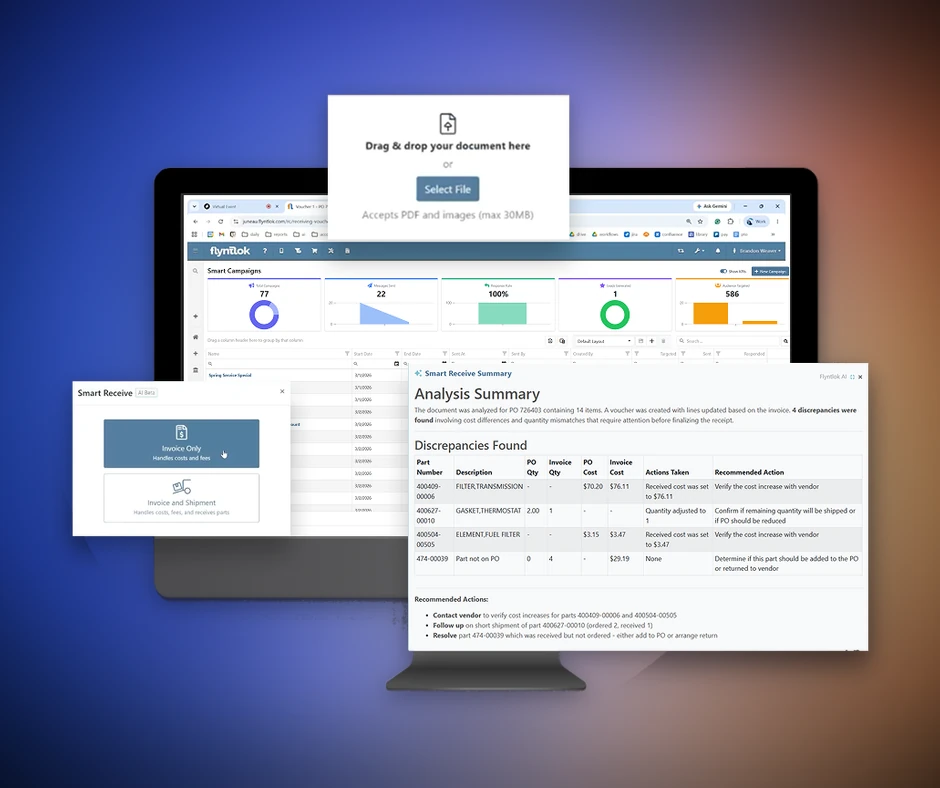
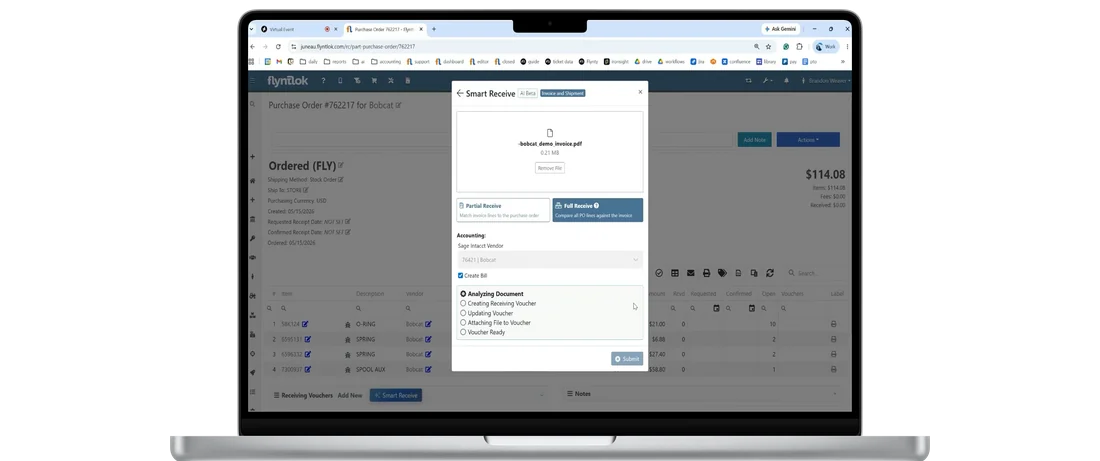
Invoice only handles costs and fees when the invoice beats the parts to your dock. Invoice and shipment handles costs and fees and receives the parts. Brandon drops in the vendor invoice, a demo invoice from Bobcat, then picks partial invoice or full receive. Partial matches only the lines on the invoice. Full receive compares everything on the PO and flags what's missing. Dealers on Sage can toggle on the accounting section to create the bill.
Smart Receive reads the header first: the invoice number, the invoice date and the freight. Then it goes line by line for quantity changes, price changes, extra parts and missing parts. On the voucher, it fills in the bill ID and carries the invoice date straight over from the Bobcat invoice.
The summary flagged cost differences on four lines, where the invoice cost came in lower than expected. Each line lists the part number, the expected cost, the invoice cost, the action taken and a recommended next step. Smart Receive received at the invoice cost and recommended verifying the change with the vendor.
Freight came over on its own, so nobody adds a fee line by hand. The invoice is attached to the voucher with a comment noting it came through Smart Receive. “This happened in seconds,” Jenny says, and on a big shipment, Brandon adds, that's real time a parts manager isn't spending line by line. Jenny sums it up: “This is where the AI piece actually becomes practical.”
Upload a vendor invoice and Smart Receive reads the invoice number, dates, item costs, quantities, freight, tax and other fees, then checks every line against the purchase order.
Smart Receive is AI built into Flyntlok purchase orders. Upload a vendor invoice and it reads the invoice number, dates, item costs, quantities, freight, tax and other fees, checks every line against the PO and flags anything that doesn't match in a plain-English summary.
Yes. Every line is checked against the purchase order and differences are flagged for your team to review. In the demo, each flagged cost came with the action taken and a recommended next step: verify the change with the vendor.
No. Flyntlok AI, Smart Receive included, comes with every Flyntlok account at no extra cost.
.svg)




.webp)
%20(1).webp)
.webp)