NEW!
Meet Flyntlok at Equip Expo 2026:
July 24, 2026
Agriculture equipment dealer software is a dealer management system (DMS) designed to connect operations across an entire dealership. A Farm Equipment guide to choosing a DMS describes it as a software tool—often cloud-based—deployed across the dealership and all of its locations. The right choice depends on your dealership profile: location count, OEM mix, rental and used-equipment volume, and how much migration risk you can absorb during the season.
Vendor pages often list modules without showing whether those modules are deep enough for the way your dealership actually runs. This guide takes the opposite approach. It defines the category in plain terms, breaks features down by department, gives you a way to compare options by dealership profile, and covers integrations, migration, cost drivers, and risk.
If you are a dealer principal, general manager, controller, or department head preparing for demos, you should finish this article with a clear list of must-have workflows, verification questions, and red flags before you ever sit through a vendor pitch.
This guide evaluates systems by department workflow, dealership profile, integration proof, implementation risk, and total cost. Product capabilities are written as demo checks unless a named source supports them, so a module label is never treated as proof that a workflow works end to end.
Evidence basis. Trade reporting supports the dealership-workflow and seasonality context; John Deere's developer documentation shows why OEM integrations need capability-level verification; and the NIST Cybersecurity Framework structures the security questions. Named Flyntlok capabilities come only from the request's pinned customer context. Everything else is framed as a buyer test rather than an assumed product fact.
The core problem this software exists to solve is disconnection. In a typical dealership, a sale often leads to service and warranty work, stock sits across multiple locations, and ongoing servicing matters as much as the initial sale, as Catalyst Computer Systems describes for machinery dealers. When departments use separate tools, ask vendors to demonstrate whether parts reservations, invoices, customer records, and machine records remain synchronized across those systems.
A well-built system ties the parts counter, the shop, the sales floor, the rental fleet, and the back office to shared records: one customer, one machine with serial history, one invoice trail. Integrated equipment-dealer ERP descriptions, such as this Odoo-focused overview, frame the same idea as equipment sales, parts counter, workshop jobs, purchasing, and accounting operating in one place.
Use this fictional harvest-season scenario during demos: Branch A has no hydraulic pump, Branch B has three, and the machine is under warranty. Ask the vendor to show, step by step, whether users can view cross-branch stock, transfer and reserve the pump against a work order, record labor and diagnostics, attach warranty documentation to the serial record, and pass the claim to accounting without re-entry. Record each step the vendor cannot demonstrate as a workflow gap.
These three terms get used loosely, and the confusion costs buyers time. Aptean's equipment ERP overview frames ERP value around optimizing maintenance schedules and tracking inventory with pinpoint accuracy in the industrial machinery and equipment business landscape.
The practical takeaway: a CRM alone is too narrow, a generic ERP is broad but not dealership-shaped, and a dealer-specific DMS aims to cover the workflows the other two miss. Many modern dealer platforms blend the categories; the label matters less than whether the system handles your actual counter, shop, and deal workflows without workarounds.
Generic software assumes a business sells a product and moves on. Agriculture dealerships do not work that way. Catalyst notes that machinery dealerships often work with one or more manufacturers, that machinery stock may be stored across multiple locations, and that agricultural and groundscare equipment dealers often experience intense seasonal peaks.
In machinery dealerships, a sale often leads to service and warranty work, and for many machinery dealers ongoing servicing and support are as important as the initial sale, so department data must connect. Industry practitioners have pointed the same direction for years: Chuck Baresich of Haggerty AgRobotics, quoted by DIS, notes that many dealerships have already adopted online parts manuals and tracking of customer serial numbers and equipment for faster service. Software that cannot keep up with that baseline is behind before you install it.
Feature lists on vendor sites tend to blur together, so translate each module into a departmental question: what should this feature accomplish, and how will we verify it does? The Farm Equipment DMS guide recommends a cross-functional selection team because parts, service, sales, accounting, and IT see different requirements. Bring those people into the evaluation. For a broad feature set that spans parts, service, sales, rentals, and reporting, see dealership management software features.
Parts is where connected data can pay off quickly because of its transaction volume. Evaluate parts lookup speed, OEM catalog connectivity, and how the system handles supersession when a part number is replaced. Verify whether inventory views show stock across all branches, whether transfers are tracked rather than handled by phone, and whether quantities reserved for open work orders are visible at the counter. One equipment-dealer ERP overview describes group stock, supersessions, and reserved quantities for open jobs; use those as demo checks rather than assuming every system includes them.
Also press vendors on the unglamorous edge cases: returned parts, core tracking, and what happens when a counter sale and a shop reservation collide on the last unit in stock. If the demo skips those scenarios, ask to see them anyway.
Service departments live and die by backlog visibility and technician time. Look for work order creation that pulls machine and customer history automatically, scheduling that shows the backlog by technician, and clear coordination between the shop and the parts counter so jobs do not stall waiting on a part nobody ordered.
Warranty deserves its own scrutiny. A sale often leads to service and warranty work in this industry, and reimbursement depends on documentation. Verify how the system captures labor, parts, and diagnostic detail against a claim, how claims are submitted, and how you track what the OEM has and has not paid. Weak warranty tracking is a quiet source of write-offs.
Wholegoods deals cross more departments than any other transaction. A trade-in arrives attached to a new-unit sale, needs inspection and a valuation, may need reconditioning in the shop, and eventually needs a clean cost basis for resale. Evaluate whether the system carries a unit's serial history from trade-in intake through inspection, work orders, and final sale, so the reconditioning cost actually lands on the unit instead of disappearing into shop overhead.
Ask how the system handles floor-planned units and how a closed deal flows to accounting. If the sales module and the service module do not share the same machine record, trade-in costing becomes a spreadsheet job, which defeats the purpose of the purchase.
If rental is part of your revenue mix, treat it as a first-class requirement, not an add-on module to skim past in the demo. The workflows to verify: reservations and availability, meter or hour-based billing, and whether service costs accumulate on the same serial record as rental revenue. Systems built for equipment dealers can bill dealer-owned rental units on hour-meter usage while tracking service cost against the same serial record, as described in this dealer ERP overview, and that serial-level pairing is what tells you whether a rental unit is actually profitable.
Also confirm how a unit moves between rental, retail, and service states, since many ag dealers run mixed fleets where a rental unit eventually becomes a used-equipment sale.
For the principal and the controller, the system's real product is visibility. Evaluate how transactions flow from department activity into financials: does a closed work order or counter sale post cleanly, or does someone re-key it? Ask how the system reports branch-level profitability, department margins, and metrics you already manage by, such as absorption, and whether those reports come standard or require custom work.
Floor planning and back-office automation belong in this conversation too. The verification question is not "do you have reporting" but "show me the exact report a general manager would review on Monday morning, built from live data, without an export to Excel."
Customer knowledge in a dealership too often lives in one salesperson's head or one service writer's memory, and it walks out the door when they do. A CRM tied to dealership records changes that: every quote, work order, parts purchase, and machine on a customer account is visible to whoever picks up the phone. That continuity matters most during ownership transitions and succession, when tribal knowledge loss is a real operational risk.
When evaluating, distinguish between a third-party CRM integration and a CRM built into the platform. Flyntlok includes a built-in CRM. Whatever system you evaluate, ask the vendor to demonstrate which customer, machine, quote, work-order, and parts records appear together and which require a separate system.
There is no universal "best" system in this category; there is a best fit for your dealership's shape. The same platform that suits a single-store dealer can frustrate a five-branch group, and a rental-heavy operation has requirements a sales-led dealer never thinks about. Before demos, write down your profile honestly: locations, OEM lines, rental and used-equipment volume, accounting stack, and service workload. Then weight your evaluation criteria accordingly, using the profiles below.
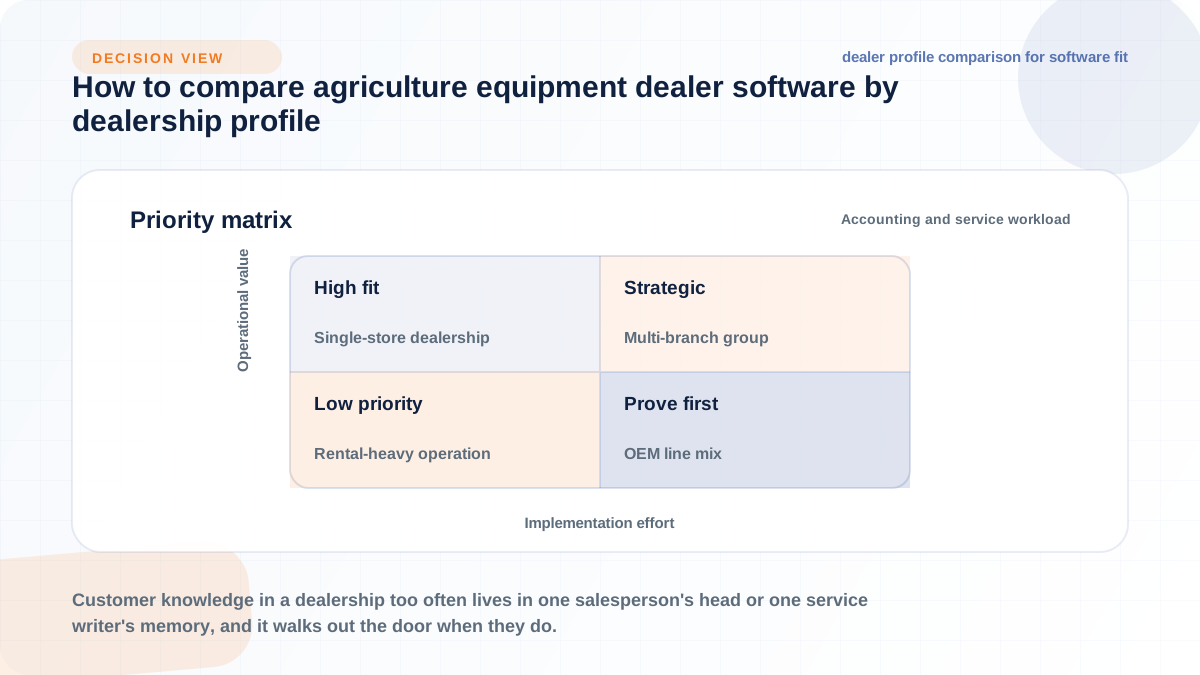
With one store, your biggest risks are adoption failure and paying for complexity you will not use. Prioritize ease of use at the parts counter and in the shop, compatibility with your existing accounting setup, and the quality of vendor support when something breaks during your busy season. A smaller dealer has less slack to absorb a rough rollout, so weight training and support quality heavily, and be skeptical of enterprise features pitched as must-haves.
Once you run multiple locations, the priorities shift toward consistency and consolidated visibility. You need group-wide inventory views, tracked branch transfers, standardized processes so a work order looks the same at every store, role-based permissions, and reporting that rolls up to the group while still isolating branch-level profitability. Machinery stock stored across multiple locations is a defining trait of this industry, per Catalyst, and any system that treats each branch as a separate island recreates the problem you are trying to solve.
If rental or used equipment drives a large share of revenue, serial-level cost tracking becomes your top criterion. For rental, that means hour-meter billing, availability management, and service cost accumulating on the unit. For used equipment, it means inspection workflows, valuation support, reconditioning costs tied to the specific machine, and a clean trail from trade-in to resale. A system that handles new wholegoods well but treats rental and used units as afterthoughts will misstate the profitability of your fastest-moving inventory.
Dealers carrying multiple manufacturer lines face an integration problem most vendor pages gloss over. An "OEM integration" claim can mean anything from full catalog, ordering, and warranty connectivity to a basic price file import, and the depth often differs by brand within the same platform. Verify catalog lookup, supersession handling, electronic ordering, and warranty workflows for each of your lines individually, not just the flagship brand the vendor demos. Assume nothing is equivalent across OEMs until you have seen it.
Integration claims are where vendor marketing and operational reality diverge most, so build your verification list before you schedule anything. The goal is to move each claim from "supported" to "shown working with our specific brands, our accounting system, and our data."
A useful pre-demo question set:
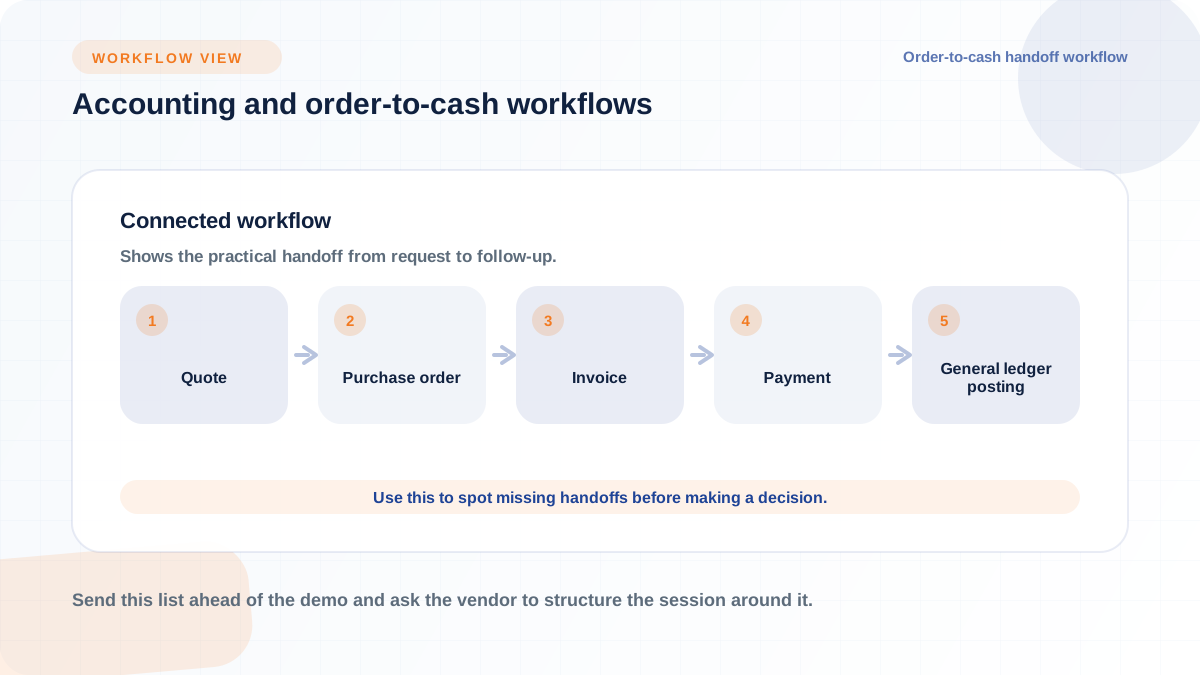
Send this list ahead of the demo and ask the vendor to structure the session around it. The three areas below explain what good answers look like.
For each manufacturer line you carry, verify four things: catalog lookup inside the system, supersession handling when part numbers change, electronic parts ordering, and warranty claim documentation and submission. John Deere's official developer documentation shows why "OEM integration" needs a workflow-level definition: its business-system APIs separate capabilities such as warranty updates rather than treating integration as one generic connector. Ask how catalog updates arrive and insist on brand-by-brand answers.
Trace one transaction end to end in the demo: quote, purchase order, invoice, payment, inventory update, and posting to the general ledger. Ask where human hands touch the data along that path and where errors would surface. There is no single correct integration pattern here; some dealers keep an external accounting package, others move fully into the platform. What matters is that the handoffs are explicit, reconcilable, and acceptable to your controller, so bring your controller to this part of the evaluation.
Evaluate reporting against the decisions you actually make: branch profitability, service backlog, parts fill rates, aged inventory. Ask whether CRM data, machine history, and department activity feed those reports from one record set or require stitching. Flyntlok includes built-in AI. The practical question to ask any vendor about AI or telematics features is the same one you would ask about any report: what data feeds it, and is your data clean enough to make it useful? Connected-equipment data is only as valuable as the workflow it changes.
Moving a live dealership onto a new system concentrates operational risk. The Farm Equipment DMS guide documents the value of a cross-functional team, employee buy-in, growth planning, and OEM and peer input during selection. Build the implementation plan around the same groups: discovery, data cleanup, migration scope, department training, go-live timing, and post-launch support. Get the vendor's migration approach in writing before you sign.
Expect the migration scope conversation to be detailed. You will need to decide what history comes over (full transaction history versus balances forward), how open items convert, and who validates the results department by department. Vendors vary widely in how much of this they handle versus how much lands on your staff, so ask directly.
Migration quality is set by data quality, and legacy systems accumulate years of duplicates, dead part numbers, and half-finished records. Before conversion, plan a cleanup pass across the core categories:
Assign an owner for each category from the relevant department rather than dumping cleanup on one office manager. Data your team validated by hand is data they will trust after go-live, which makes cleanup double as adoption work.
Agricultural dealers face intense seasonal peaks, as Catalyst notes, and a system cutover during planting or harvest compounds every other risk in the project. If the new system stumbles when the parts counter has a line out the door, staff will improvise workarounds that undermine the platform for months. Plan go-live for your slowest window, define fallback processes in advance (how you write a manual work order or counter ticket if the system is down), and validate migrated data before, not after, the switch. Ask every vendor what their go-live support looks like during your first peak season on the system.
Training has to be department-specific rather than a single all-hands walkthrough. The parts team needs counter and transfer workflows, service writers need work order and scheduling flows, and the controller needs posting and reconciliation. Farm Equipment's practitioner interviews recommend training around the employee's job rather than every button in the tool and using knowledgeable system champions for follow-up help. Name a process owner in each department who learns the system deeply and becomes the first line of support for that team.
Compare every vendor using the same itemized cost categories. Total cost of ownership can include the subscription or license, implementation, migration, training, integrations, support, and internal staff time. Confirm each amount directly with the vendor and get it in writing.
Ask each vendor exactly how pricing scales: per user, per location, per module, per transaction volume, or some combination, and what contract terms and increases look like over a multi-year horizon. Model the price against your realistic growth, not just today's headcount. A quote that looks cheap for one store can compound unpleasantly across a group, and a per-module price forces you to decide up front which departments are in scope.
Professional services are often where quotes diverge most. Itemize data migration, configuration, integration setup, training, and go-live support separately, and ask what support tier is included afterward versus billed. Then add the cost vendors never quote: your own staff's time for data cleanup, validation, and training, which is real capacity pulled from daily operations. Budgeting that internal time honestly is the difference between a planned project and a stalled one.
Integrations and automation carry ongoing ownership costs that outlast implementation. OEM catalogs need updates, item masters need discipline to stay clean, and each integration needs someone accountable when it breaks. Ask vendors who maintains catalog and integration connections over time, what happens when an OEM changes its systems, and whether those updates are included or billed. Automation built on messy data automates the mess, so budget for ongoing data ownership as a standing responsibility, not a one-time project task.
Moving your whole operation onto one platform concentrates both value and risk, so due diligence here is standard practice, not paranoia. Ask about role-based permissions (who can change prices, write off inventory, or post to the ledger), audit trails showing who did what, backup practices and recovery expectations, and how the vendor handles outages. These are ordinary questions any serious vendor should answer without hedging.
Data ownership deserves equally direct treatment. Confirm in the contract that your dealership's data is yours, that you can export it in usable formats at any time, and what happens to your data if you leave the platform. Use the NIST Cybersecurity Framework as a checklist frame for these questions. You are not auditing the vendor's engineering; you are verifying they can answer basic governance questions clearly.
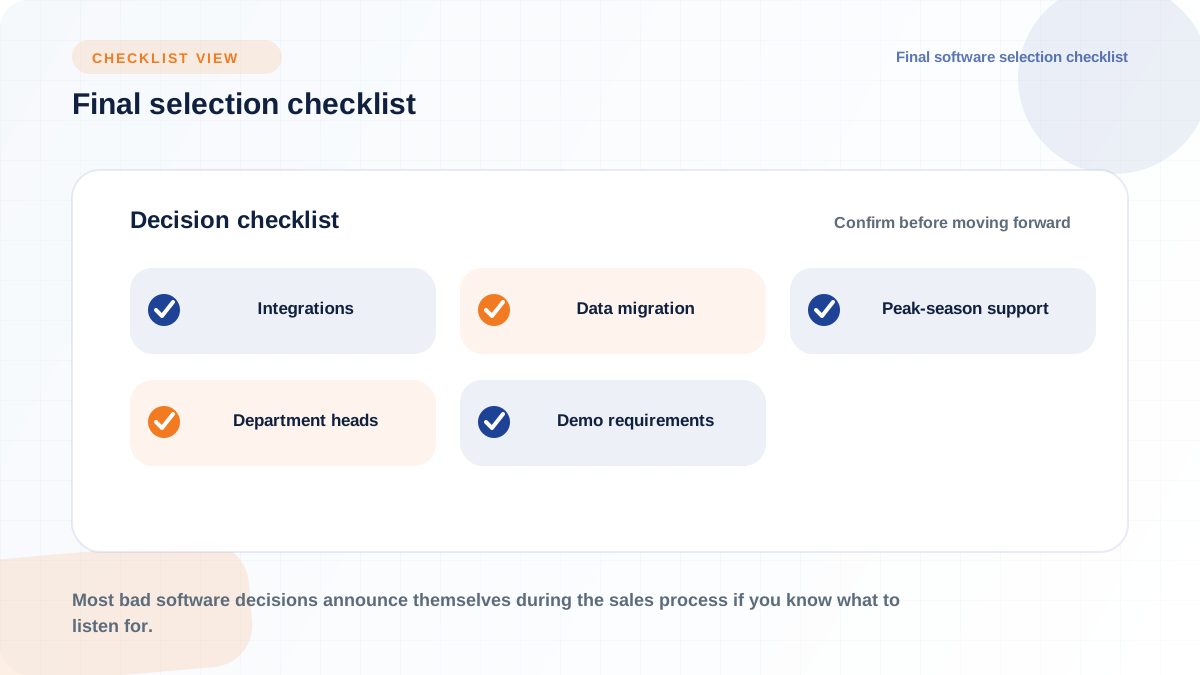
Most bad software decisions announce themselves during the sales process if you know what to listen for. The pattern to watch is vagueness in exactly the areas where your operational risk is highest: integrations, migration, and support during peak season.
Warning signs worth treating seriously:
One or two of these can be a conversation; several together are a pattern. Vendors who serve dealerships well tend to volunteer this information because they have answered it a hundred times.
The dealers who choose well are the ones who arrive at demos with requirements instead of collecting impressions. Before you commit, work through this sequence with your department heads at the table.
None of this makes the decision for you, but it changes the dynamic of every vendor conversation. Instead of reacting to a feature tour, you are testing a system against the way your dealership actually runs, which is the only comparison that matters.