



Lorem ipsum dolor sit amet, consectetur adipiscing elit. Suspendisse varius enim in eros elementum tristique. Duis cursus, mi quis viverra ornare, eros dolor interdum nulla, ut commodo diam libero vitae erat. Aenean faucibus nibh et justo cursus id rutrum lorem imperdiet. Nunc ut sem vitae risus tristique posuere.
50204/IHK-2673
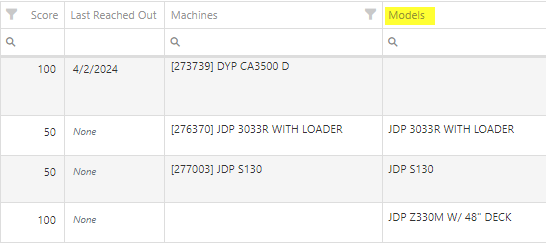
added a column to show Models
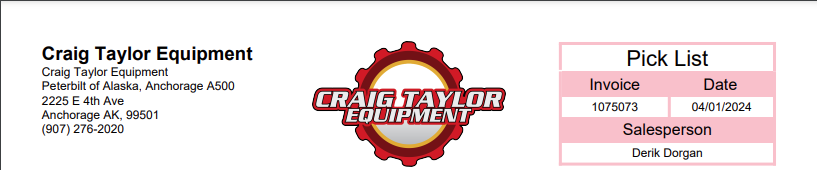
50582/IHK-2859Add sales persons name to picklist
50193/IHK-2382When quoting a model for a customer that has specific pricing set on that model, it needs to behave like an item and show the discount off of the model's list.50485/IHK-2745Add timestamp of exact time WO was invoiced
Fleet Cards On Work Orders - (Ticket #FD-2895)
Opportunity:Service Managers at dealerships that service fleet-owned vehicles have requested the ability to associate a customer’s fleet card with a work order for a fleet vehicle so that they can ensure that parts orders on that work order receive the appropriate fleet discounts from part vendors.Solution:For dealer locations that accept fleet cards, a selector has been added to the work order creation form that allows the user to select from a list of saved fleet cards for a customer. A new fleet card can be added by clicking the plus icon next to the selector and filling out the form. On the work order dashboard, fleet card information is displayed in the customer section and can be edited. When parts orders are added to the work order, the fleet card is associated with the resulting invoice and can be used to receive vendor discounts the same as would be done on a standard sales order.
Signature Capture On Rental Contracts - (Ticket #FD-2897)
Opportunity:Service Managers at dealerships that service fleet-owned vehicles have requested the ability to associate a customer’s fleet card with a work order for a fleet vehicle so that they can ensure that parts orders on that work order receive the appropriate fleet discounts from part vendors.Solution:For dealer locations that accept fleet cards, a selector has been added to the work order creation form that allows the user to select from a list of saved fleet cards for a customer. A new fleet card can be added by clicking the plus icon next to the selector and filling out the form. On the work order dashboard, fleet card information is displayed in the customer section and can be edited. When parts orders are added to the work order, the fleet card is associated with the resulting invoice and can be used to receive vendor discounts the same as would be done on a standard sales order.



.svg)
.svg)
.svg)


